An IT resume can be technically accurate and still perform poorly once it enters an employer’s hiring system. The gap usually isn’t the candidate’s skills. It’s what happens between submission and recruiter review: how the resume gets parsed, whether it maps to the target role, and whether the skills on the page are backed by evidence. ATS resume mistakes sit in that gap, and most of them have nothing to do with tricking software. This article separates what the ATS actually does from what a recruiter decides, and shows where IT resumes commonly lose clarity, relevance or visibility along the way.
What Are ATS Resume Mistakes?
An ATS resume mistake is anything that reduces how clearly or accurately a resume’s information gets captured, understood, or judged relevant, at any point between submission and recruiter review. It is not the same as automatic rejection. These mistakes generally fall into seven groups:
- Parsing and formatting mistakes,
- Job-alignment mistakes,
- Keyword mistakes,
- Skills-evidence mistakes,
- Content mistakes,
- Optimization mistakes, and
- Recruiter-readability mistakes.
A resume can be technically parsed without error and still fail on alignment or evidence, which is why treating “ATS mistakes” as only a formatting problem misses most of the picture.
How an ATS Processes an IT Resume
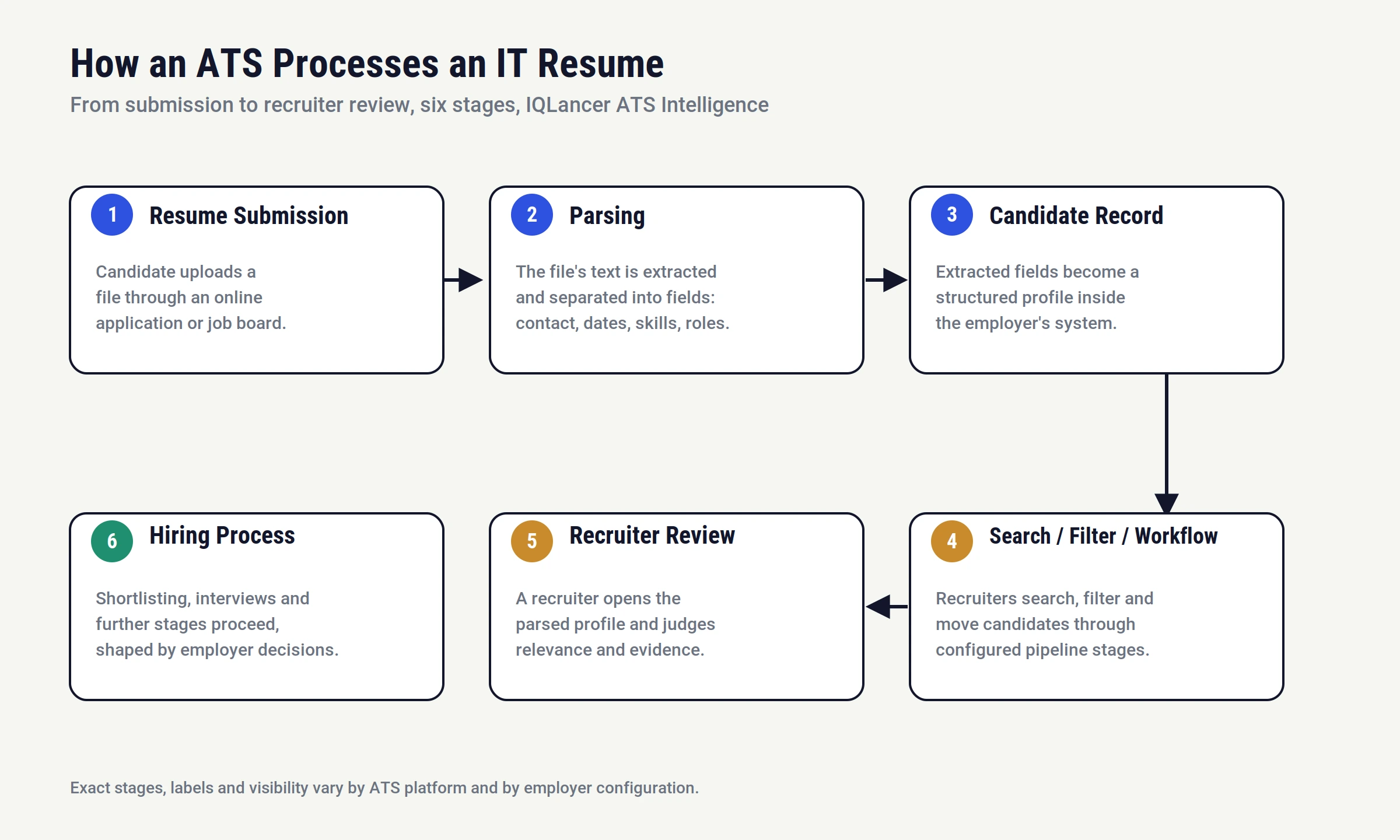
The practical flow is resume submission, parsing, candidate record creation, search/filter/workflow, recruiter review, and further hiring stages. Parsing is the stage where the system reads the raw file and extracts structured fields such as contact details, job titles, dates, skills and education.
Each vendor runs its own extraction and field-labeling pipeline, which is why the same resume can be captured with different accuracy on different platforms rather than following one universal process. Resume Optimizer Pro describes this as a multi-stage pipeline (text extraction, tokenization, sectioning, entity recognition, structured output), and notes that identical resumes can produce different extracted skill counts across vendors.
Once a candidate record exists, recruiters search, filter and move candidates through workflow stages rather than reading every resume from top to bottom. Unified.to documents this candidate/application/job data model as the common structure behind most modern ATS platforms.
What Is an ATS Panel and What Can Recruiters See?
An “ATS panel” generally refers to the recruiter-facing interface where hiring staff review candidate profiles, parsed resume data, application status and workflow stage. Depending on the platform and the employer’s configuration, this may include candidate search and filters, notes or activity history, and screening information.
Oleeo and ApplicantStack both describe this dashboard-style layer as the core of how recruiters manage a pipeline. What a specific user sees is not universal: Greenhouse’s own support documentation shows that visibility into notes, scorecards and interview feedback can be restricted by user type and permission policy, meaning two recruiters at the same company may legitimately see different amounts of information about the same candidate.
When a resume is well parsed, the panel typically reflects it accurately. When parsing goes wrong, the recruiter is often working from a reconstruction that doesn’t match the original document, which Metaintro describes as one of the least understood parts of the process.
The Most Common ATS Resume Mistakes IT Professionals Make
Parsing and formatting. Image-based or scanned PDFs, text embedded only in graphics, complex layouts, tables, text boxes, and unusual section headings all raise parsing risk. This is platform-dependent rather than universal: CVCraft’s testing found that some systems merge table-cell text into a single string while others handle simple tables somewhat better, and Enhancv notes that native, non-table columns are handled more reliably by current parsers than the older “columns always fail” advice suggests.
Job alignment. Sending the same generic resume to unrelated IT roles, or using terminology that doesn’t map clearly to the target position, weakens relevance even when the resume parses cleanly. A DevOps-focused resume and a Data Analyst-focused resume should not read identically.
Skills and evidence. Listing tools and technologies without context, including outdated technologies, or claiming certifications with no demonstrated application, makes a skills section look like a keyword list rather than a credential.
Content. Duty-only bullets, vague statements, and experience sections with no clear ownership or outcome reduce both parsed clarity and recruiter interest.
Optimization. Treating resume writing as a scoring exercise, repeating terms unnaturally, or inserting irrelevant keywords to chase a theoretical match percentage, tends to hurt credibility more than it helps visibility.
ATS Formatting Mistakes That Can Make Resume Information Harder to Parse
Structure matters because parsers rely on predictable patterns to label information correctly. Standard section headings such as “Work Experience,” “Education” and “Skills” are recognized more consistently than creative alternatives. Resumemate and The Interview Guys both point out that content placed inside text boxes is frequently skipped entirely, regardless of file format. Critical facts (job titles, dates, employer names, skills) should exist as plain, selectable text rather than inside a graphic.
A practical safer default: clear structure, standard section headings, text-based important information, consistent date formatting, readable layout, and a final parsing check before submission. Because platform behavior varies, testing your own document (see the section below) is more reliable than following a single universal rule.
ATS Keywords: What to Include and What to Avoid
ATS keywords work best as job-specific terminology drawn directly from the posting: technical skills, tools, platforms, certifications, relevant job titles, responsibilities and domain terms. The useful framework is job requirement, relevant term, candidate experience, evidence.
A requirement of “CI/CD” is weak as a bare keyword but stronger written as a sentence such as “Built and maintained CI/CD pipelines using Jenkins and GitHub Actions for automated testing and deployment.” That example is illustrative, not a claim every candidate should make.
Zimyo frames the underlying goal correctly: matching the language of the posting while keeping the resume genuinely consistent with real experience.
Why Keyword Stuffing Is Not Resume Optimization
More keywords does not equal more relevance. Unnatural repetition, irrelevant terms, and skill lists with no supporting evidence reduce recruiter readability and can read as a credibility problem rather than a strength. SimpleCVBuilder notes that hidden or white-text keyword stuffing is still read by modern parsers regardless of color, so it provides no real advantage while creating real risk if a recruiter opens the raw text.
Hidden keywords, keyword dumping, or any attempt to manipulate a screening system should be avoided entirely.
How Resume Optimization Should Work for IT Professionals
Optimization should follow target role, job description, requirements, your experience, relevant terminology, evidence, final resume, in that order. Start from the specific posting rather than a generic template. Identify what the employer actually requires, then map your real experience to that language, then support each claim with a concrete example. This produces a resume optimized for relevance and clarity, not one optimized to satisfy a hypothetical scoring algorithm.
Why a Generic Resume Can Hurt Role Relevance
A single resume sent to every IT opening tends to under-communicate for all of them. A resume built around SQL, dashboards, data cleaning and analytics evidence reads differently from one built around CI/CD, containers, cloud infrastructure and automation, even when the same person could plausibly do either job. This applies across Data Analyst, DevOps, Cloud, Cybersecurity, AI Engineering and Full Stack roles: the point is not that every IT professional needs a different resume for every micro-specialty, but that the terminology and evidence should reflect the specific requirements of the role being applied to.
Why Listing IT Skills Without Evidence Is a Resume Mistake
A bare list such as “AWS, Docker, Kubernetes, Jenkins” tells a recruiter what you’ve been exposed to, not what you’ve done. A stronger version, such as “Used AWS EC2 and Docker to deploy a containerized application and automated deployment steps through a CI/CD pipeline,” gives the skill a context and an outcome. This is an illustration of the principle, not a suggestion that every candidate needs these specific technologies.
Why Weak Experience Bullets Can Hurt ATS and Recruiter Review
There’s a meaningful difference between stating a responsibility and describing an action, technology, context and outcome. An ATS does not evaluate bullet quality the way a human does, but stronger, specific bullets make relevant information easier to identify during parsing and far more persuasive once a recruiter is reading the resume directly.
ATS-Friendly Resume vs ATS-Optimized Resume
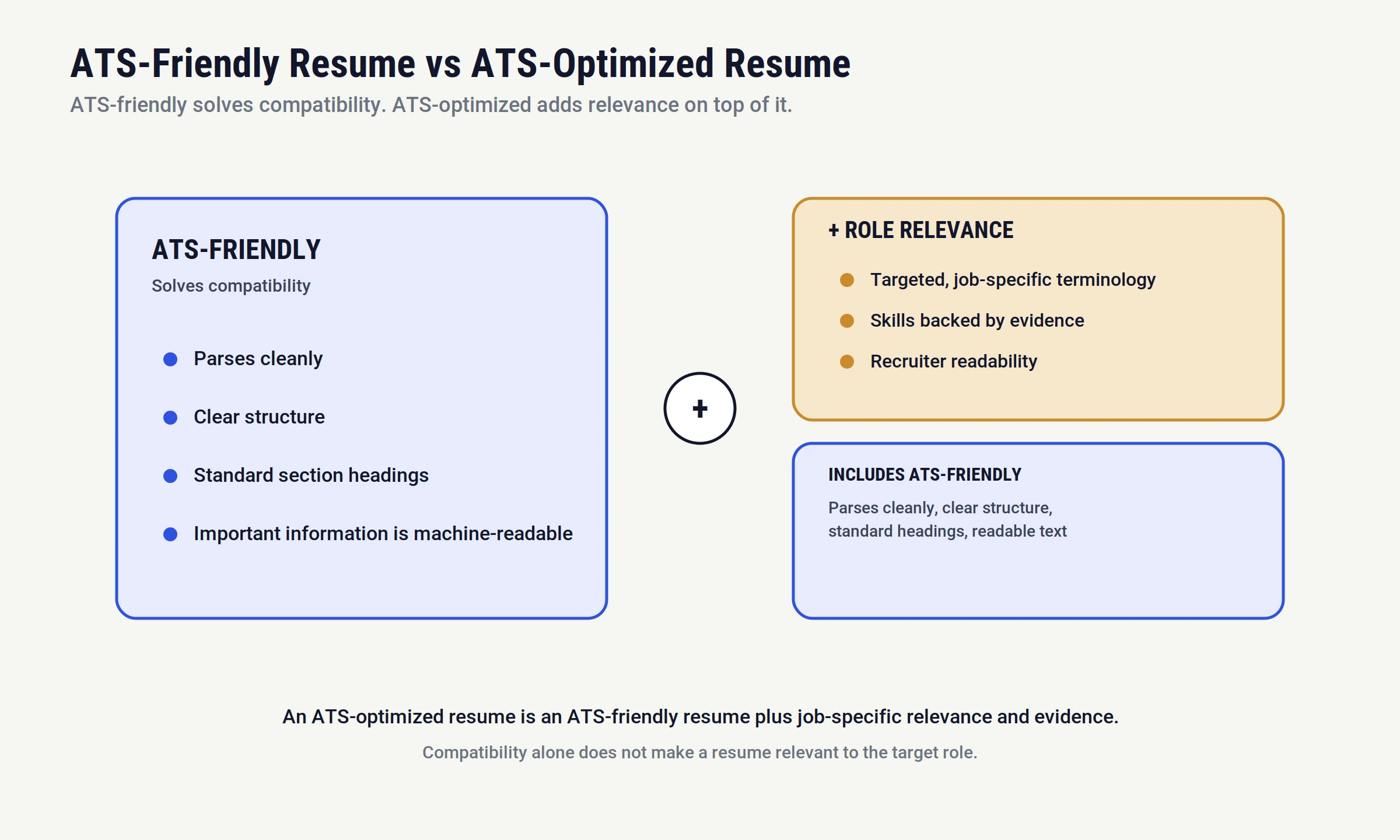
| ATS-Friendly Resume | ATS-Optimized Resume |
|---|---|
| Easy to parse | Easy to parse and role relevant |
| Clear structure | Clear structure and targeted terminology |
| Standard headings | Standard headings and job-specific language |
| Important information is machine-readable | Important information is machine-readable and evidence-backed |
| Consistent formatting | Consistent formatting and recruiter readability |
ATS-friendly is not the same as ATS-optimized. An ATS-friendly resume solves the compatibility and readability problem. An ATS-optimized resume also solves the relevance, evidence and job-alignment problem. A resume can be perfectly parseable and still fail to communicate why a candidate fits a specific role.
Dos and Don’ts of an ATS-Friendly Resume
These dos and don’ts of resume formatting are the practical shorthand version of everything covered above, useful as a final pass before you submit.
Do’s
- use clear section headings, use relevant job terminology,
- tailor the resume to the target role,
- keep important information in readable text,
- demonstrate skills through experience or projects,
- maintain consistent dates,
- review the final document, and
- prioritize recruiter readability.
Don’t:
- stuff keywords,
- use irrelevant terminology,
- rely on images for critical information,
- use confusing or creative section names,
- submit the same resume for every role,
- assume every ATS handles documents identically,
- optimize only for a theoretical score, or
- make unsupported claims.
How to Check Whether Your Resume Is Being Parsed Correctly
Verify that your name, contact information, job titles, employer names, dates, skills, certifications, education, projects and technologies remain logical and intact when extracted as plain text.
A practical test: copy the full text of your resume into a plain text file, or select and copy it directly from the PDF as Resumeworded suggests, and check whether the information still appears in the correct order and without missing sections. This is not a perfect simulation of every ATS, but it catches the most common parsing failures before submission.
ATS Resume Mistakes vs Recruiter Screening Problems
| Problem | More likely issue |
|---|---|
| Important information is misparsed | Parsing / formatting |
| Required skill is missing | Job alignment |
| Skill appears but has no evidence | Content / evidence |
| Resume is difficult to understand | Recruiter readability |
| Strong resume but no interview | Could involve competition, role fit, hiring conditions, experience, location, or employer decisions |
This distinction matters because not every lack of response is an ATS problem. Blaming the software for every silence can prevent a candidate from fixing the parts of the resume actually within their control.
ATS Resume Optimization for Different IT Roles
| Role | Relevant Evidence Areas |
|---|---|
| Data Analyst | SQL, Excel, BI tools, analytics, business outcomes |
| DevOps | CI/CD, cloud, Linux, containers, automation |
| Cloud Engineer | Cloud platform, infrastructure, networking, security |
| Cybersecurity | Monitoring, SIEM, incident response, security controls |
| AI Engineer | Python, machine learning, model development, APIs, deployment |
| Full Stack Developer | Frontend, backend, APIs, databases |
These are not universal ATS requirements. The specific job description determines which terminology and requirements actually matter for a given application.
When an ATS-Friendly Resume Still Doesn’t Get Interview Calls
ATS compatibility does not guarantee recruiter contact, an interview, a shortlist, or an offer. Candidate-controlled factors include formatting, alignment, evidence and clarity. Employer and market-controlled factors include competition, experience level requirements, location, compensation range, hiring demand, internal candidates, timing and business changes. Repeated silence after applying is frequently a scale and competition problem rather than a formatting failure, a distinction HR Gazette’s recruiter-facing research also points to.
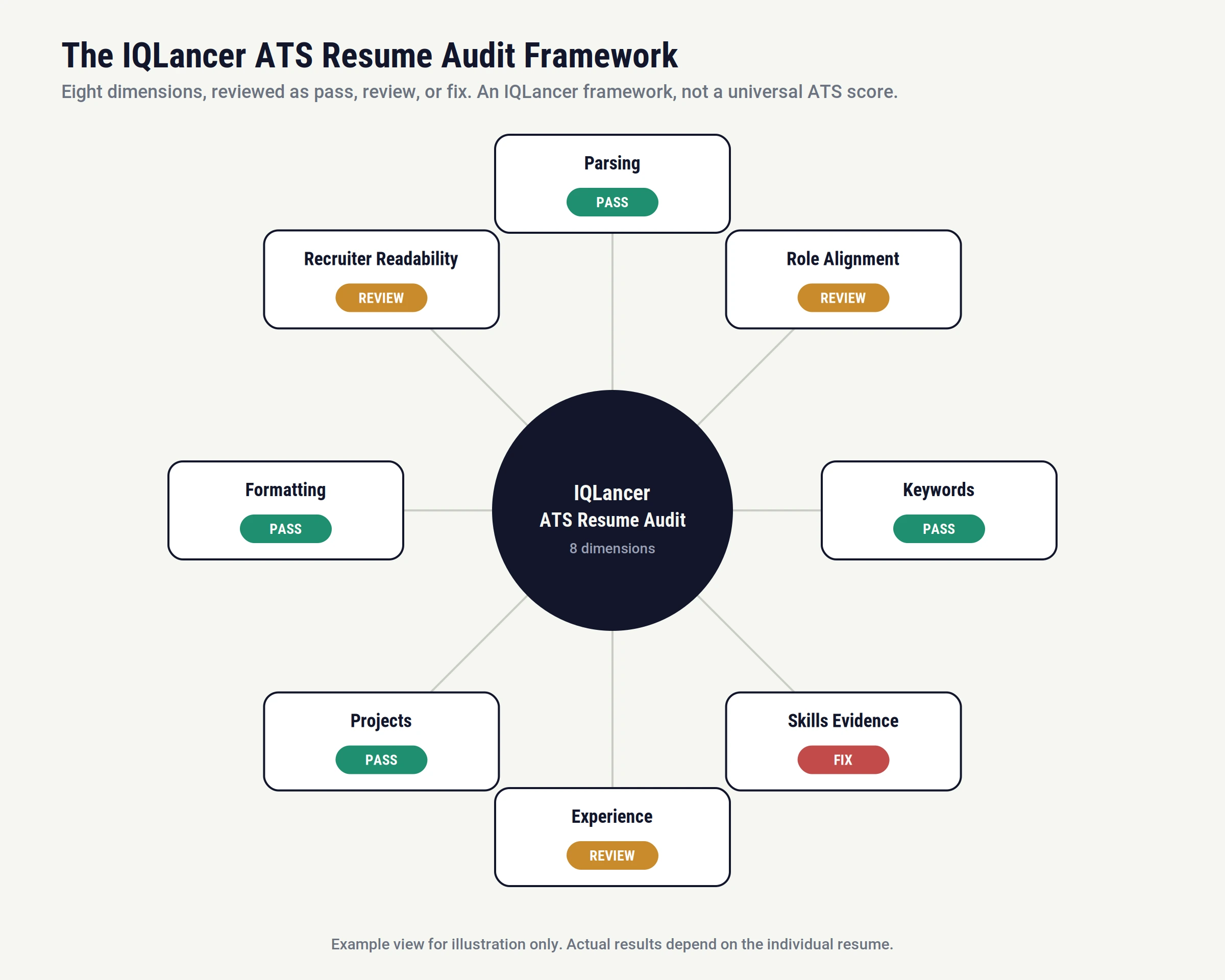
The IQLancer ATS Resume Audit Framework
IQLancer’s approach audits eight dimensions: parsing, role alignment, keywords, skills evidence, experience, projects, formatting, and recruiter readability.
Each dimension is reviewed as pass, review, or fix, rather than reduced to a single invented percentage. This is an IQLancer framework, not an industry-standard scoring system, and it cannot predict how a specific employer’s ATS will actually process a given resume.
ATS Resume Checklist for IT Professionals
- Target role is clear
- Resume reflects relevant job requirements
- Important information is text-based
- Section headings are clear and standard
- Dates are consistent
- Skills are relevant to the target role
- Skills are supported by evidence
- Keywords appear naturally, drawn from the job description
- No keyword stuffing
- Projects support claimed technical skills
- Experience bullets communicate real contribution
- Formatting remains readable in plain text
- Final document has been reviewed
- Resume works for both automated systems and human readers
- No guarantee-based assumptions about ATS screening
Conclusion
Don’t build a resume to impress an ATS. Most ATS resume mistakes are not about outsmarting software. They’re about clarity, relevance and evidence getting lost somewhere between submission and recruiter review. Build a resume that can be processed cleanly, matches the target role in its own language, communicates credible evidence for every claim, and stays persuasive to the humans who ultimately make the hiring decision.
FAQ
What are the most common ATS resume mistakes?
The most common issues fall into parsing and formatting, job alignment, keyword use, skills evidence, content quality, and optimization. Formatting problems (tables, graphics-only text, unusual headings) create parsing risk, while weak evidence and generic targeting hurt relevance even on a resume that parses cleanly.
What makes an ATS-friendly resume?
Clear structure, standard section headings, important information kept as plain text rather than inside graphics or text boxes, and consistent formatting. This solves compatibility, not relevance.
How should I use ATS keywords?
Pull terminology directly from the job description and use it naturally within real experience or project descriptions, not as a standalone list. Evidence behind each term matters more than the number of terms used.
What is an ATS panel?
It’s the recruiter-facing interface where hiring staff review candidate profiles, parsed resume data, application status and workflow stage. What’s visible varies by platform and by the employer’s permission settings.
Are tables bad for ATS resumes?
It depends on the platform. Some systems handle simple tables reasonably well; others merge or scramble cell content. Avoiding tables for core content (job titles, dates, skills) is the lower-risk default when you don’t know which system an employer uses.
Can an ATS read PDF resumes?
Most current systems read clean, text-based PDFs without issue. The real risk is a PDF exported from a design tool that embeds text as an image, which most parsers cannot extract at all.
How should IT professionals approach resume optimization?
Start from the specific job description, identify genuine requirements, map real experience to that language, and back every claim with evidence. Optimization means increasing relevance and clarity, not adding more keywords.
Does an ATS-friendly resume guarantee an interview?
No. ATS compatibility removes a barrier to being seen accurately. Whether a candidate gets an interview still depends on role fit, competition, experience level, and employer decisions the candidate cannot control.
2 thoughts on “ATS Resume Mistakes IT Professionals Make in 2027”