Most “devops projects” lists are tool checklists: add Docker, add Kubernetes, add Terraform, publish a repo. Recruiters and hiring managers see hundreds of repositories built this way, and they can usually tell within two minutes whether a candidate understood what they built or copied a tutorial.
The gap isn’t technology exposure; it’s engineering evidence. IQlancer guide takes a different approach: it treats every project as a case study, starting from a real engineering problem and working through architecture, automation, security, and failure handling, so that what ends up on GitHub can actually be defended in an interview.
You’ll leave with project blueprints, a portfolio strategy, and a way to match devops projects to the roles you’re actually targeting.
What Makes a DevOps Project Worth Showing?
Before picking a project, it helps to separate two things that look similar on a resume but read very differently to an engineer reviewing your GitHub: touching a tool once, and producing evidence that you understand how it behaves under real conditions.
Tool exposure looks like: “I used Docker.” “I deployed to Kubernetes.” “I wrote a Terraform file.” These statements say a command was run successfully once. They say nothing about whether the candidate understands state management, image layering, network policies, or what happens when a deployment fails halfway through.
Engineering evidence looks like a system that has an identifiable problem statement, a reasoned architecture, automation instead of manual steps, some form of validation, a documented failure scenario, and a README that explains trade-offs rather than just commands.
A 2026 breakdown of DevOps hiring put it plainly: when comparing two candidates one with a cloud certification and no projects, versus one with a deployed Terraform-plus-CI/CD-plus-Kubernetes stack on GitHub hiring managers pick the second candidate almost every time. Certifications signal structured learning.
Projects signal applied capability. Strong devops portfolio projects combine infrastructure, automation, version control, CI/CD, cloud usage, containers, monitoring, logging, security, reliability thinking, troubleshooting, and documentation but only in service of a real problem, not as a checklist to pad.
Current DevOps Job Requirements: What 2026-27 Postings Actually Ask For
This section exists because project selection should follow demand, not assumption; understanding what recurs across current postings tells you which capabilities are worth building evidence for before you touch a single tool.
Reviewing multiple current job descriptions and industry breakdowns rather than one company’s listing shows a consistent pattern of COMMON requirements: Linux fundamentals, Git-based version control, scripting (Bash, Python), a CI/CD platform, at least one cloud provider (AWS, Azure, or GCP), Docker, and basic monitoring. roadmap.sh’s DevOps job description breakdown lists CI/CD tool proficiency, coding and scripting skills, cloud platform expertise, containerization and orchestration, and version control expertise as the recurring technical core.
FREQUENTLY REQUESTED (shows up often but not universally): Kubernetes/EKS/AKS, Terraform or another Infrastructure-as-Code tool, Ansible or a configuration-management tool, and observability tooling such as Prometheus, Grafana, CloudWatch, or Datadog.
A May 2026 sample of Terraform-related postings shows this combination repeating across employers, with one listing asking for strong Terraform experience including modules and state management, alongside CI/CD pipeline experience with GitHub Actions or Jenkins, and another combining Terraform, Bicep, or ARM templates with Azure DevOps or GitHub Actions and AKS-based Kubernetes.
ROLE-SPECIFIC requirements vary by company and seniority. Contract and staff-augmentation postings on platforms like Dice frequently pair Terraform-based infrastructure with Kubernetes, monitoring, logging, and system reliability for mid-to-senior roles, while entry-level postings lean more heavily on CI/CD and basic cloud usage alone.
ADVANCED / DIFFERENTIATING signals for 2026 center on platform engineering and security depth. Industry hiring guides describe platform engineers as needing proficiency in Kubernetes, Terraform, CI/CD, developer portals, and security governance, with a product mindset, and note that organizations are increasingly building internal developer platforms (IDPs) using tools like Backstage, ArgoCD, and Crossplane.
A 2026 skills breakdown also flags Kubernetes depth beyond basics custom resource definitions, operators for stateful applications, and Helm charts as a differentiator rather than a baseline expectation.
CURRENT MARKET OBSERVATION: DevSecOps skills are commanding a premium. One 2026 industry source cites DevSecOps salaries in the $153K–$204K range, tied to the reality that a significant share of organizations report introducing security vulnerabilities during rushed CI/CD deployments. This is a market observation from industry reporting, not a guarantee about any individual employer’s pay bands.
Tutorial Project vs. Portfolio Engineering Project
This comparison exists because two projects can use identical technologies and produce completely different hiring signals the difference lives in the decisions behind the implementation, not the tool list.
| Dimension | Tutorial Project | Portfolio Engineering Project |
|---|---|---|
| Problem definition | Followed a walkthrough | States a real problem it solves |
| Architecture | Copied diagram | Explained in the candidate’s own words, with trade-offs |
| Automation | Manual steps, screenshots | Automated pipeline, no manual console clicks |
| Testing | None or copied test file | Meaningful tests tied to the actual system |
| Security | Hardcoded or ignored | Secrets management, least privilege, scanning |
| Monitoring | None | Metrics, logs, alerts tied to real failure modes |
| Failure handling | Not addressed | At least one documented failure + recovery scenario |
| Documentation | “How to run” only | Problem, architecture, decisions, limitations, lessons learned |
| Reproducibility | Works only on author’s machine | Another engineer can rebuild it from the README |
| Interview defensibility | Falls apart under “why” questions | Candidate can justify every major decision |
The IQLancer Project Intelligence Framework
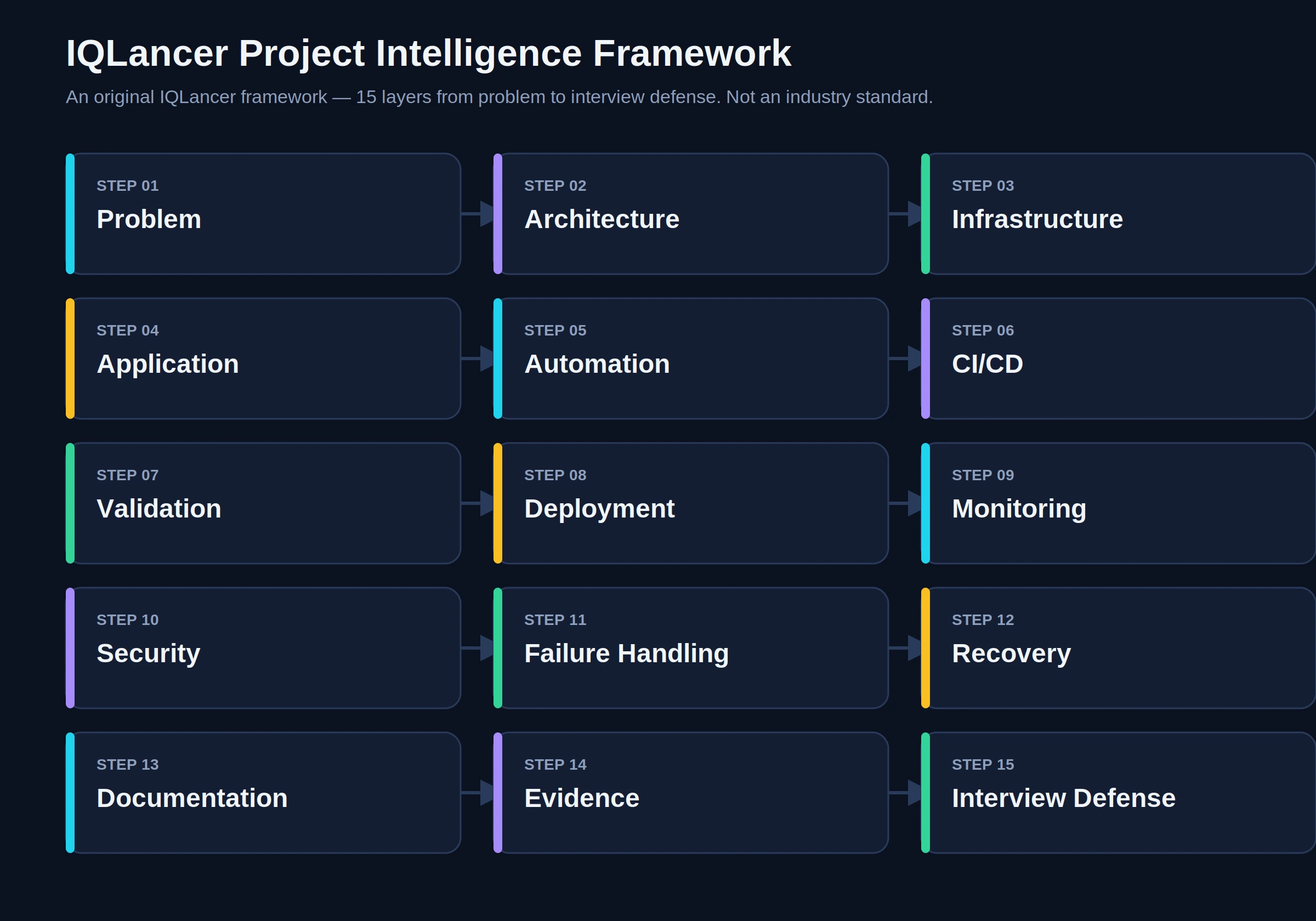
This is an original IQLancer framework, not an industry-standard model. It exists to give you a repeatable way to evaluate whether a project idea is worth building before you invest time in it.
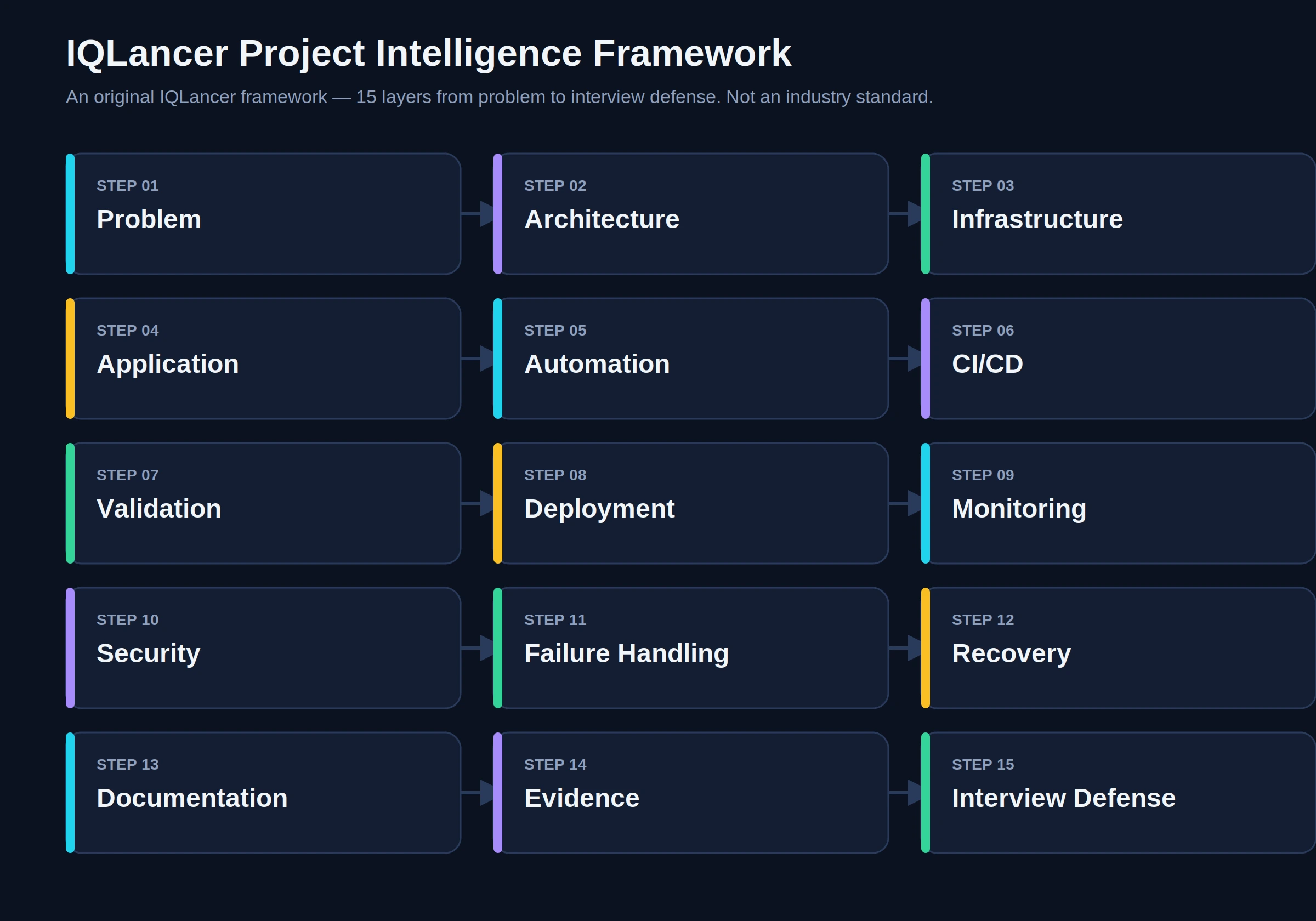
- Problem: What breaks, what’s manual, or what’s unreliable without this project?
- Architecture: What are the components and how do they connect?
- Infrastructure: What compute, network, and storage does this need, and why?
- Application: What is actually being deployed or operated?
- Automation: What manual step is being removed?
- CI/CD: How does code become a running system without human hands touching production?
- Validation: How do you know it worked?
- Deployment: How does the change reach the environment?
- Monitoring: How do you know it’s healthy after deployment?
- Security: How are secrets, access, and dependencies protected?
- Failure Handling: What happens when something breaks?
- Recovery: How do you get back to a healthy state?
- Documentation: Can someone else understand and rebuild this?
- Evidence: What’s visible in the repository to prove all of the above?
- Interview Defense: Can you explain and justify every layer above?
DevOps Project Maturity Model
IQLancer framework. Complexity should scale with demonstrated capability, not with the number of logos on a resume.
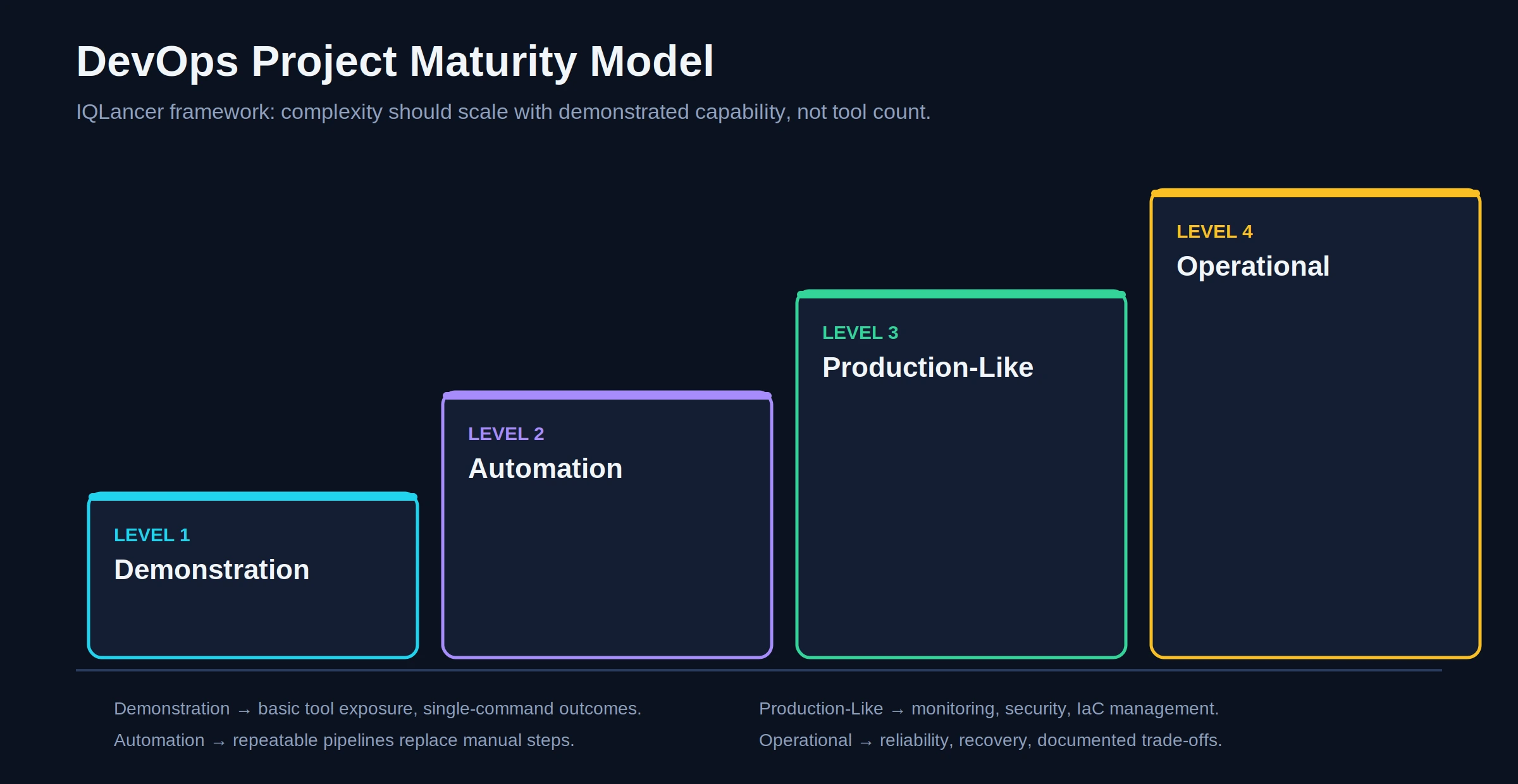
- Level 1 Demonstration: Basic tool usage. A container runs, a script executes. Useful as a learning step, weak as portfolio evidence on its own.
- Level 2 Automation: The workflow is repeatable. A pipeline builds, tests, and deploys without manual intervention.
- Level 3 Production-Like: Monitoring, security controls, and infrastructure management are present. The system behaves like something a team could actually operate.
- Level 4 Operational: Reliability engineering is visible recovery procedures, documented trade-offs, and evidence of iteration based on something that failed.
A single Level 4 project is generally stronger evidence than five Level 1 projects, because it demonstrates judgment under real constraints rather than exposure to a tool.
Portfolio Strategy: Why 3–4 Strong Projects Beat 10–15 Shallow Ones
IQLancer recommendation. A reviewer spends a limited amount of time per candidate. Ten shallow repositories dilute attention across surface-level work; three or four deep projects let a reviewer form a confident opinion about your capability. An example progression (not a mandatory sequence):
- Project 1: Linux + Git + automated deployment fundamentals
- Project 2: CI/CD + automated testing + automated deployment
- Project 3: Cloud + Terraform + Docker
- Project 4: Kubernetes + observability + security (DevSecOps)
This is one reasonable strategy, not a fixed formula the right combination depends on the roles you’re targeting.
Project Blueprints
Each project below follows the same structure so you can compare engineering problem, evidence, and hiring signal directly. Depth varies deliberately: beginner projects emphasize fundamentals cleanly executed, advanced projects emphasize systems thinking under failure.
Project 1 : Automated Zero-Downtime Deployment Pipeline for a Web App
Difficulty: Beginner Best For: First-time portfolio builders, career switchers, students proving foundational capability.
Engineering Problem: Manual deployment (SSH in, pull code, restart service) is slow and error-prone. This project replaces that with a pipeline that builds, tests, and deploys automatically on every merge.
Why Build It: It proves you can chain Git, CI, and deployment into one repeatable workflow the single most common expectation across current postings, per roadmap.sh’s DevOps skill list.
What You Will Build: A small web application (any language) deployed to a single VM or PaaS target, with a CI/CD pipeline that triggers on push, runs tests, and deploys automatically only if tests pass.
Architecture: Developer push → GitHub → CI/CD pipeline (build + test) → Artifact → Deploy step → Target server → Health check
Technology Options: GitHub Actions or GitLab CI/CD (pipeline), a lightweight app framework, a single Linux VM (cloud free tier) or a PaaS target.
Why These Technologies: GitHub Actions is free for public repos and directly reflects what postings ask for; a single VM keeps the architecture legible instead of hiding the pipeline behind managed abstractions.
Alternative Approaches: Jenkins instead of GitHub Actions if targeting companies that still run self-hosted CI; a container registry + PaaS deploy instead of raw VM SSH if you want container practice folded in early.
Prerequisites: Basic Linux commands, Git branching, one scripting language.
Implementation Blueprint:
- Build a minimal application with at least one automated test.
- Initialize a Git repository with a clear branch strategy (main + feature branches).
- Write a CI workflow that installs dependencies and runs tests on every push.
- Add a build stage that produces a deployable artifact.
- Add a deploy stage that only runs on main branch merges and only if tests pass.
- Add a post-deploy health check (HTTP request to a health endpoint) that fails the pipeline if the app doesn’t respond correctly.
- Document rollback: what happens, manually or automatically, if the health check fails.
Automation: Test execution, build, deploy, and post-deploy verification should all run without manual steps.
CI/CD: Source → Build → Test → Artifact → Deploy → Verify. Scanning and monitoring are intentionally lighter here this project’s job is to prove the core pipeline works cleanly.
Testing + Validation: Unit tests in CI; a smoke test (basic HTTP health check) after deployment.
Security: Store deployment credentials as CI secrets, never in code. Use a dedicated deploy user with minimal permissions rather than root/admin.
Observability: A basic health endpoint and pipeline logs are sufficient at this level; full dashboards belong in later projects.
Failure Scenarios: Deployment fails midway; tests fail on a bad commit; health check fails after deploy.
Recovery: Detect via failed health check → diagnose via pipeline logs → roll back to previous artifact → verify health check passes → document what caused the failure.
Cost Awareness: Use free-tier compute; shut down or destroy the instance when not actively demonstrating the project.
Local vs Cloud vs Production-Like: Cloud lab real infrastructure, small scale, not production traffic.
GitHub Evidence: README.md, app/, .github/workflows/, docs/pipeline-diagram.png.
README Must Explain: The manual process being replaced, the pipeline stages, how to run it locally, how deployment is triggered, and what happens on failure.
Resume Evidence: Better: “Built an automated CI/CD pipeline that tests and deploys a web application on every merge, including automated rollback on failed health checks.” Avoid inventing metrics you didn’t measure.
Interview Defense:
- Why did you choose this CI/CD tool? (Tests whether the choice was deliberate or default.)
- What happens if a test fails on main? (Tests understanding of pipeline gating.)
- How do you roll back a bad deployment? (Tests operational thinking, not just “it deploys.”)
- Where are your credentials stored, and why there? (Tests basic security hygiene.)
Skills Demonstrated: Git High. CI/CD High. Scripting Medium. Cloud Medium. Docker Optional. Kubernetes Optional.
Hiring Signal: Demonstrates the ability to replace manual deployment with a reliable, automated workflow the baseline expectation in almost every current posting.
Common Mistakes: Deploying without any test gate; hardcoding credentials in the workflow file; no rollback plan; treating a successful deploy as the finish line instead of verifying health after.
How to Make It Stronger: Add a staging environment before production; add a manual approval gate; add a basic scan step (dependency check) to start building toward Project 4’s DevSecOps depth.
Project 2 : Containerized Application with CI/CD to a Container Registry
Difficulty: Beginner–Intermediate Best For: Candidates who’ve completed Project 1 and want to add container evidence deliberately, not decoratively.
Engineering Problem: “Works on my machine” environment drift, and manual image builds that aren’t reproducible or scanned for vulnerabilities.
Why Build It: Docker is a recurring requirement across nearly every current posting reviewed, and this project proves more than “I created a container” it proves you understand image builds, registries, and CI-driven image publishing.
What You Will Build: An application packaged as a Docker image, built and pushed to a container registry automatically by CI, with a basic vulnerability scan gating the push.
Architecture: Push to Git → CI build → Docker build → Image scan → Push to registry (if clean) → Pull + run on target
Technology Options: Docker, GitHub Actions, GitHub Container Registry or Docker Hub, a scanning tool such as Trivy or Grype.
Why These Technologies: Registry choice should match what the target employer uses; scanning at build time reflects the DevSecOps expectation showing up across 2026 hiring guides rather than treating security as a separate afterthought.
Alternative Approaches: AWS ECR/Azure ACR instead of Docker Hub if targeting a specific cloud provider’s ecosystem.
Prerequisites: Completion of Project 1 concepts; basic Dockerfile syntax.
Implementation Blueprint:
- Write a Dockerfile using multi-stage builds to keep the final image small.
- Add a
.dockerignoreto avoid leaking build artifacts or secrets into the image. - Build the image locally and verify it runs correctly with expected environment variables.
- Add a CI stage that builds the image on every push to main.
- Add an image-scanning step; fail the pipeline on high/critical vulnerabilities.
- Push the image to a registry only if the scan passes, tagged with the Git commit SHA (not just
latest). - Document how to pull and run the published image locally.
Automation: Image build, scan, tag, and push should be fully automated.
CI/CD: Source → Build (Docker) → Scan → Tag → Push → (optional) Deploy.
Testing + Validation: Container starts successfully and passes a basic health check; scan results are visible in CI logs or artifacts.
Security: No secrets baked into image layers; use build-time secrets mounts or runtime environment injection instead. Never publish a .env file with real values.
Observability: Container logs sent to stdout/stderr (12-factor practice) so any downstream log aggregator can pick them up later.
Failure Scenarios: Vulnerability scan blocks a push; image fails to start due to missing environment variable; image size balloons unexpectedly.
Recovery: Diagnose via scan report or container logs, patch the base image or dependency, rebuild, re-scan, re-push.
Cost Awareness: Public registries are typically free for open-source images; clean up unused image tags periodically.
Local vs Cloud vs Production-Like: Local build, cloud-hosted registry a hybrid lab setup.
GitHub Evidence: Dockerfile, .dockerignore, .github/workflows/build-scan-push.yml, README.md documenting image tags and scan policy.
Resume Evidence: “Containerized an application with a multi-stage Dockerfile and automated a build-scan-push pipeline that blocks vulnerable images from reaching the registry.”
Interview Defense:
- Why multi-stage builds? (Tests image-size and attack-surface awareness.)
- What did your scanner find, and what did you do about it? (Tests whether security is real or decorative.)
- How do you handle secrets during the build? (Tests container security fundamentals.)
- Why tag by commit SHA instead of
latest? (Tests reproducibility understanding.)
Skills Demonstrated: Docker High. CI/CD High. Security Medium. Scripting Medium. Kubernetes Optional.
Hiring Signal: Evidence that container usage is intentional and security-aware, not surface-level.
Common Mistakes: Using latest as the only tag; ignoring scan results; leaving debug tools and secrets in the final image layer.
How to Make It Stronger: Add image signing; add a base-image update automation (e.g., Renovate/Dependabot) to keep the image patched over time.
Project 3 : Cloud Infrastructure with Terraform (Infrastructure as Code)
Difficulty: Intermediate Best For: Candidates targeting cloud-focused DevOps or platform roles.
Engineering Problem: Manually clicking through a cloud console produces infrastructure nobody can reproduce, review, or roll back safely. Multiple current postings explicitly ask for Terraform experience including modules and state management, with CI/CD integration.
Why Build It: Infrastructure as Code is described in 2026 industry coverage as the default expectation rather than a differentiator “infrastructure as code has been around for years, but in 2026 it’s the default, not the exception.”
What You Will Build: A small but real cloud environment (e.g., a VPC, a compute instance or serverless function, and basic IAM roles) fully defined in Terraform, with a CI pipeline that runs plan on pull requests and apply only after manual approval.
Architecture: Terraform code (modules) → CI (plan on PR) → Manual approval → CI (apply) → Cloud provider → Deployed infrastructure → State stored remotely
Technology Options: Terraform, AWS/Azure/GCP (pick one matching your target roles), remote state backend (S3+DynamoDB, Terraform Cloud, or equivalent), GitHub Actions.
Why These Technologies: Terraform is cloud-agnostic and shows up across postings regardless of provider; remote state with locking prevents the classic “two engineers apply at once and corrupt state” failure.
Alternative Approaches: CloudFormation or Bicep if targeting AWS-only or Azure-only shops respectively trade-off is portability versus deeper native-provider integration.
Prerequisites: Basic cloud account familiarity, understanding of IAM/least privilege concepts.
Implementation Blueprint:
- Design the minimum viable architecture (e.g., VPC + subnet + one compute resource + IAM role).
- Structure the code into reusable modules rather than one flat file.
- Configure a remote backend with state locking.
- Write variables for environment-specific values (dev/staging) instead of hardcoding.
- Add a CI workflow that runs
terraform planautomatically on pull requests and posts the plan as a PR comment. - Require manual approval before
terraform applyruns against real infrastructure. - Add a budget alert or cost-tracking tag on all resources.
- Document the full teardown (
terraform destroy) procedure.
Automation: Plan generation, validation, and (post-approval) apply should be automated; manual console changes should never be the source of truth.
CI/CD: Source → Validate/Lint → Plan → Manual Approval → Apply → Verify (resource exists + reachable).
Testing + Validation: terraform validate and terraform plan in CI; a post-apply check (e.g., can you reach the deployed resource) to confirm the applied state actually works.
Security: IAM roles scoped to least privilege; no long-lived cloud credentials in CI use OIDC federation from your CI platform to the cloud provider instead of static access keys, following the pattern GitHub’s own documentation on OIDC recommends for eliminating long-lived secrets.
Observability: Cloud provider’s native monitoring (CloudWatch/Azure Monitor/Cloud Monitoring) on the deployed resource, plus a budget/cost alert.
Failure Scenarios: State lock conflict from concurrent applies; a misconfigured security group opening unintended access; drift between actual infrastructure and Terraform state.
Recovery: Detect via failed plan or drift-detection run → diagnose against state file and cloud console → correct via code (not console) → re-apply → verify → document the drift cause.
Cost Awareness: Use free-tier-eligible resource sizes, tag resources for cost tracking, and always run terraform destroy after demonstrating the project rather than leaving infrastructure running.
Local vs Cloud vs Production-Like: Cloud lab, small scale clearly not production traffic, but real managed infrastructure.
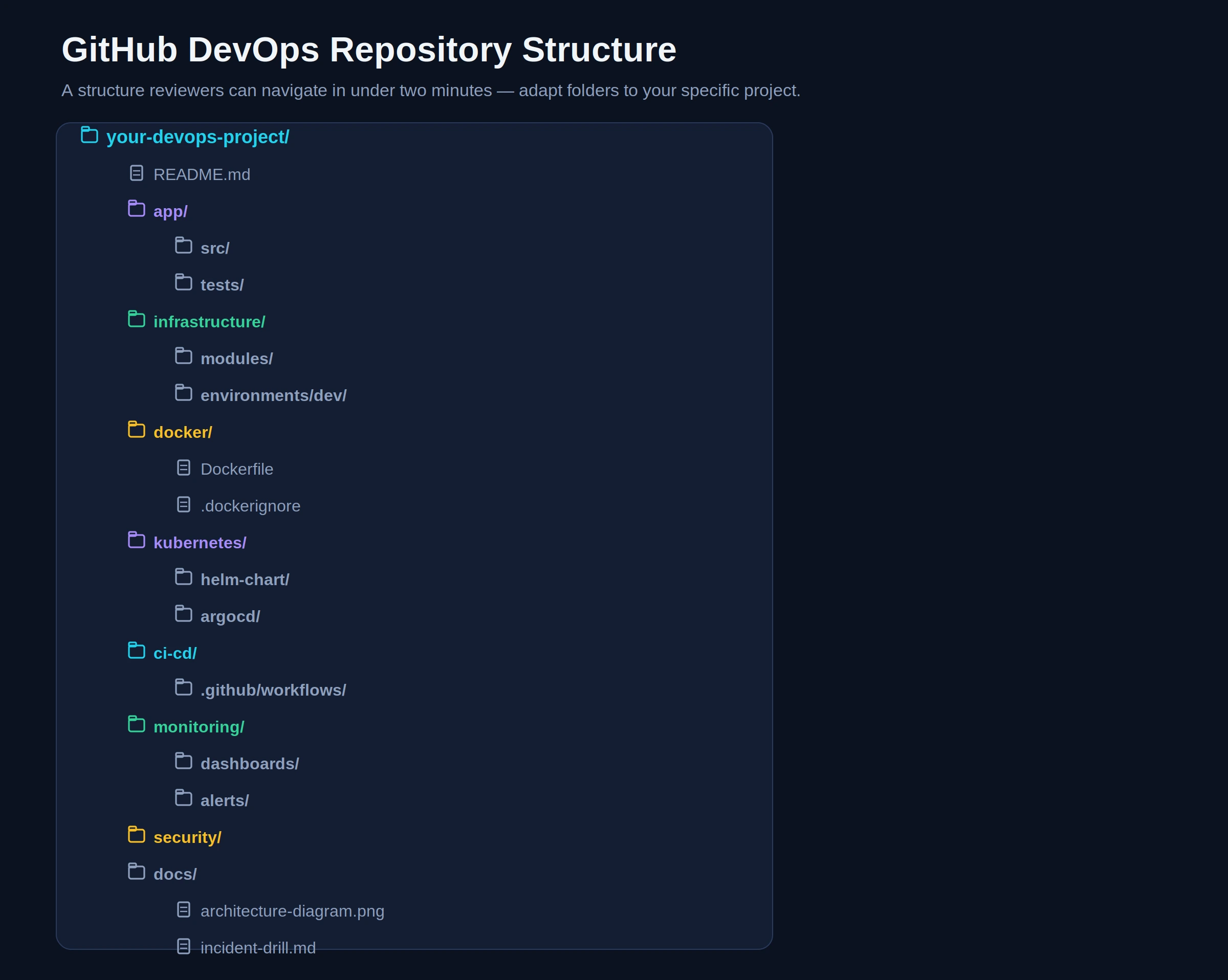
GitHub Evidence: infrastructure/modules/, infrastructure/environments/dev/, .github/workflows/terraform.yml, docs/architecture-diagram.png, README.md.
Resume Evidence: “Defined cloud infrastructure entirely as code using modular Terraform, with a CI pipeline that requires plan review and manual approval before any change reaches the environment.”
Interview Defense:
- Why remote state with locking? (Tests understanding of team-scale IaC failure modes.)
- Why OIDC instead of static access keys in CI? (Tests current security practice awareness.)
- How would you handle drift if someone changed something manually in the console? (Tests operational maturity.)
- What would you change before this touched real production traffic? (Tests honesty about lab-vs-production distinction.)
Skills Demonstrated: Cloud High. Terraform/IaC High. Security Medium-High. Scripting Medium. Kubernetes Optional.
Hiring Signal: Evidence of reproducible, reviewable infrastructure change management a core platform-engineering-adjacent capability.
Common Mistakes: Local-only state (no locking, no team-safety); hardcoded credentials in .tf files; no destroy/cleanup step, leaving resources running unnecessarily.
How to Make It Stronger: Add automated drift detection (scheduled terraform plan with no expected changes); add policy-as-code scanning (e.g., Checkov or tfsec) to the pipeline.
Project 4 : Kubernetes Deployment with Observability and DevSecOps Pipeline
Difficulty: Advanced Best For: Candidates targeting platform engineering, SRE-adjacent, or senior DevOps roles.
Engineering Problem: Running containers reliably at scale requires more than kubectl apply it requires health checks, resource limits, secrets handling, monitoring, and a secure delivery pipeline. This project intentionally combines several current “advanced/differentiating” signals rather than adding Kubernetes just to look impressive.
Why Build It: 2026 hiring coverage consistently pairs Kubernetes with observability and security depth as the differentiator between “DevOps generalist” and platform/senior-track candidates, and notes Kubernetes proficiency going beyond basics to CRDs, operators, and Helm charts as the 2026 bar for meaningful depth.
What You Will Build: A containerized application deployed to Kubernetes (via a managed service like EKS/AKS/GKE, or a local cluster like kind/minikube for a lab-scale version), deployed through a GitOps-style pipeline, with Prometheus/Grafana monitoring and a security-scanning gate.
Architecture: Git repo (app + manifests) → CI (build, test, scan, push image) → GitOps controller (ArgoCD/Flux) syncs manifests → Kubernetes cluster → Prometheus scrapes metrics → Grafana dashboards → Alerts
Technology Options: Kubernetes (managed or kind/minikube for a lab version), Helm, ArgoCD or Flux, Prometheus + Grafana, Trivy or similar for image/manifest scanning.
Why These Technologies: GitOps tooling reflects a documented 2026 shift one industry source reports GitOps adoption reaching 64%, with 81% of adopters reporting higher infrastructure reliability and faster rollback and separates “I deployed to Kubernetes once” from “I built a system where Git is the source of truth for what’s running.”
Alternative Approaches: A local kind/minikube cluster is a legitimate, honestly-labeled lab-scale substitute for a managed cluster if cloud cost is a constraint label it clearly as a local lab, not production-like, in your README.
Prerequisites: Completion of Projects 2 and 3; comfort with YAML and basic Kubernetes objects (Pod, Deployment, Service).
Implementation Blueprint:
- Package the application with a Helm chart (or plain manifests for a smaller version), including resource requests/limits and readiness/liveness probes.
- Store manifests/chart in Git as the single source of truth.
- Install ArgoCD (or Flux) and point it at the repository so cluster state syncs automatically from Git.
- Extend the CI pipeline from Project 2: build, test, scan, push image, then update the manifest’s image tag in Git (triggering GitOps sync) rather than deploying directly from CI.
- Deploy Prometheus and Grafana (via Helm charts) into the cluster.
- Build at least one dashboard showing real application metrics (request rate, error rate, latency) not just default cluster metrics.
- Configure at least one meaningful alert (e.g., error rate above threshold, pod crash-looping).
- Deliberately break something (kill a pod, misconfigure a probe) and document detection → diagnosis → recovery using the dashboards and alerts you built.
Automation: Image build/scan/push, manifest update, and cluster sync should all be automated; only the initial approval gate (if any) should require a human.
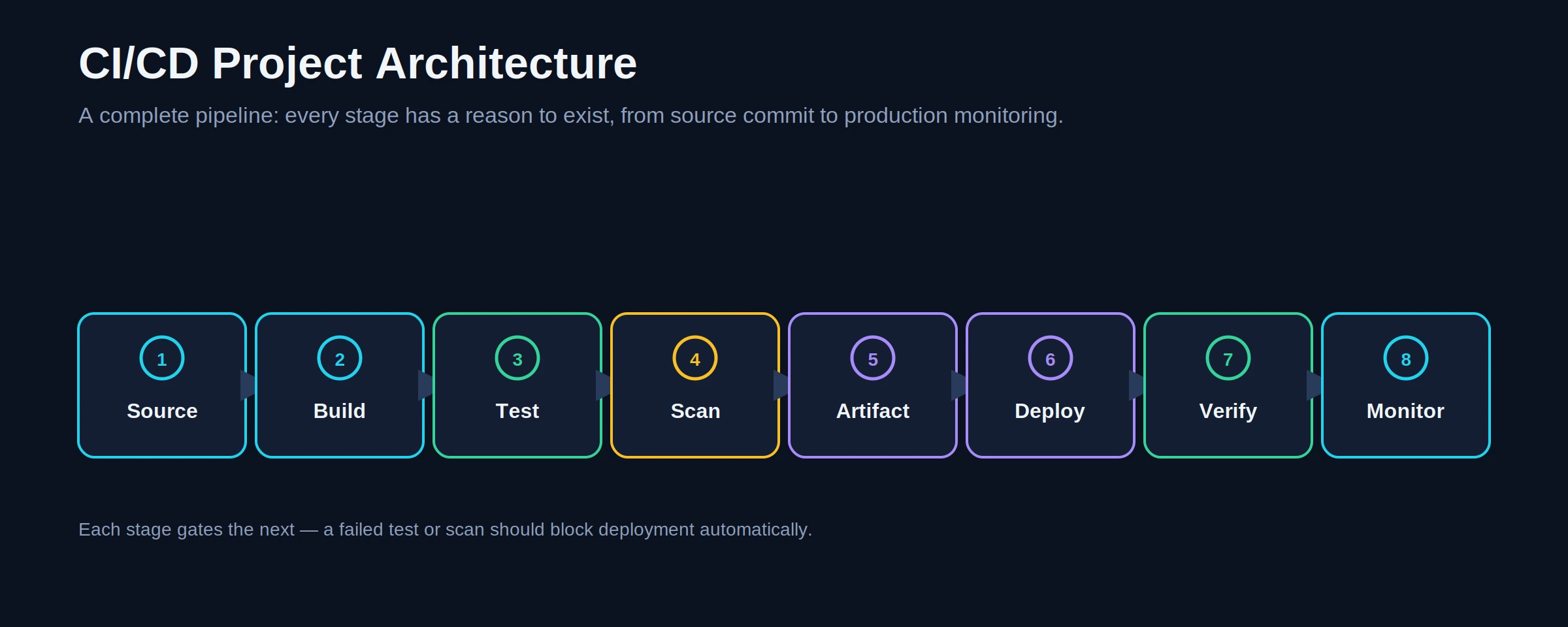
CI/CD: Source → Build → Test → Scan → Push Image → Update Manifest → GitOps Sync → Deploy → Verify (readiness probe) → Monitor.
Testing + Validation: Application tests in CI; readiness/liveness probes as deployment-level validation; a synthetic smoke test post-deploy hitting a real endpoint.
Security: Kubernetes Secrets (or an external secrets manager) for sensitive values, never plain ConfigMaps; network policies restricting pod-to-pod traffic; image scanning gating the pipeline, aligned with the general CI/CD hardening principle that least-privilege credentials, pinned action versions, and OIDC over static credentials reduce supply-chain risk; resource limits to prevent one workload starving the cluster.
Observability: Prometheus metrics, Grafana dashboards tied to actual failure modes you tested, and alerts wired to at least a log or notification channel the difference this section is built to teach between “I installed Grafana” and an actual diagnostic workflow.
Failure Scenarios: Pod crash-loop from a bad image; probe misconfiguration causing false-unhealthy status; GitOps drift between cluster and repo; a scan blocking a legitimate deploy.
Recovery: Detect via alert or dashboard anomaly → diagnose via kubectl describe/logs and Grafana → recover via GitOps rollback (revert the Git commit, let the controller resync) → verify via dashboard returning to baseline → document root cause and prevention.
Cost Awareness: Use a local kind/minikube cluster for most development; if using a managed cluster, destroy node groups when not actively demonstrating, and clearly document the cost trade-off in the README.
Local vs Cloud vs Production-Like: This project can be built as either a local lab (kind/minikube) or a cloud-hosted, production-like lab be explicit in the README about which one you built, since claiming a local cluster is “production-grade” is a documented portfolio red flag.
GitHub Evidence: app/, helm-chart/ or k8s-manifests/, .github/workflows/, argocd/ (Application manifests), monitoring/ (dashboard JSON, alert rules), docs/architecture-diagram.png, docs/incident-drill.md.
Resume Evidence: “Built a GitOps-driven Kubernetes deployment with automated image scanning, Prometheus/Grafana observability, and a documented incident drill covering detection, diagnosis, and recovery.” Do not claim “managed production Kubernetes infrastructure” unless that reflects real professional experience.
Interview Defense:
- Why GitOps instead of deploying directly from CI? (Tests understanding of auditability and rollback.)
- Walk me through what happens when a pod crash-loops. (Tests real operational understanding, not memorized theory.)
- How are secrets handled in this cluster? (Tests security depth.)
- What would you change before running real user traffic through this? (Tests honest self-assessment.)
- How would you scale this if traffic tripled? (Tests capacity-planning thinking.)
- What did the incident drill teach you? (Tests reflective engineering practice, a signal hiring managers specifically look for.)
Skills Demonstrated: Kubernetes High. CI/CD High. Monitoring High. Security High. Terraform/IaC Medium (if cluster is provisioned via IaC). Networking Medium.
Hiring Signal: Evidence of production-adjacent operational thinking deployment, security, and reliability handled as one connected system rather than three separate add-ons.
Common Mistakes: No resource limits (one workload can starve the cluster); dashboards that only show default cluster metrics instead of application-level signals; claiming a local lab cluster is production-grade; skipping the failure-drill step entirely.
How to Make It Stronger: Add a service mesh (Istio/Linkerd) for mTLS between services; add horizontal pod autoscaling tied to a custom Prometheus metric; add a chaos-engineering step (e.g., manually killing pods on a schedule) to make the failure drill repeatable rather than one-off.
AI + DevOps in 2026-27 : Where It Helps and Where It’s a Risk
This section exists because AI-assisted workflows are now embedded in day-to-day DevOps work, and portfolio projects that use AI without validation can introduce exactly the kind of risk a hiring manager is screening for.
Practical, defensible uses of AI in a devops project include log analysis and summarization, drafting documentation, generating boilerplate scripts, and assisting with troubleshooting narratives a 2026-27 industry breakdown frames this as AI helping pipeline debugging, test generation, log analysis, incident summaries, deployment risk review, and runbook creation.
The risk side is well-documented and specific to infrastructure code. Unlike a wrong conversational answer, a Terraform resource with an incorrect attribute name simply fails to plan, but a security group with incorrect logic can open production systems to the internet, and a Kubernetes manifest with the wrong API version can fail silently on some clusters while behaving unpredictably on others. Package hallucination compounds this: research cited in 2026 coverage puts LLM package-name hallucination rates at roughly 5% to 22% depending on model and language, and attackers have begun registering those hallucinated names as real, malicious packages a technique known as slopsquatting.
IQLANCER RECOMMENDATION: If you use AI assistance anywhere in a portfolio project writing a Dockerfile, generating a Terraform module, drafting a CI workflow say so in the README, and show the validation step you added (dependency allow-listing, terraform plan review, manual code review) rather than presenting AI output as if you wrote and verified every line unaided. The engineer, not the assistant, remains responsible for validation, security, and the operational decision to ship.
Cost-Aware DevOps
Cloud spend left running after a demo is a small but real red flag it suggests a candidate who doesn’t think about resource lifecycle.
Practical habits: use free-tier-eligible resource sizes, tag every resource for cost tracking, set a budget alert on any account you use for portfolio work, and run the teardown command (terraform destroy, deleting a cluster, stopping an instance) as the last documented step of every project, not an afterthought.
Certification vs. Projects
IQLancer framework note: a certification demonstrates structured learning and a recognized credential; a project demonstrates applied capability and produces evidence a reviewer can inspect directly. Neither guarantees a hiring outcome on its own. Certifications can complement projects well when the certification maps to a real gap for example, an AWS certification alongside a Terraform-on-AWS project reinforces the same evidence from two angles but a stack of certifications with no supporting project asks a reviewer to take capability on faith.
Job Description → Project Matching
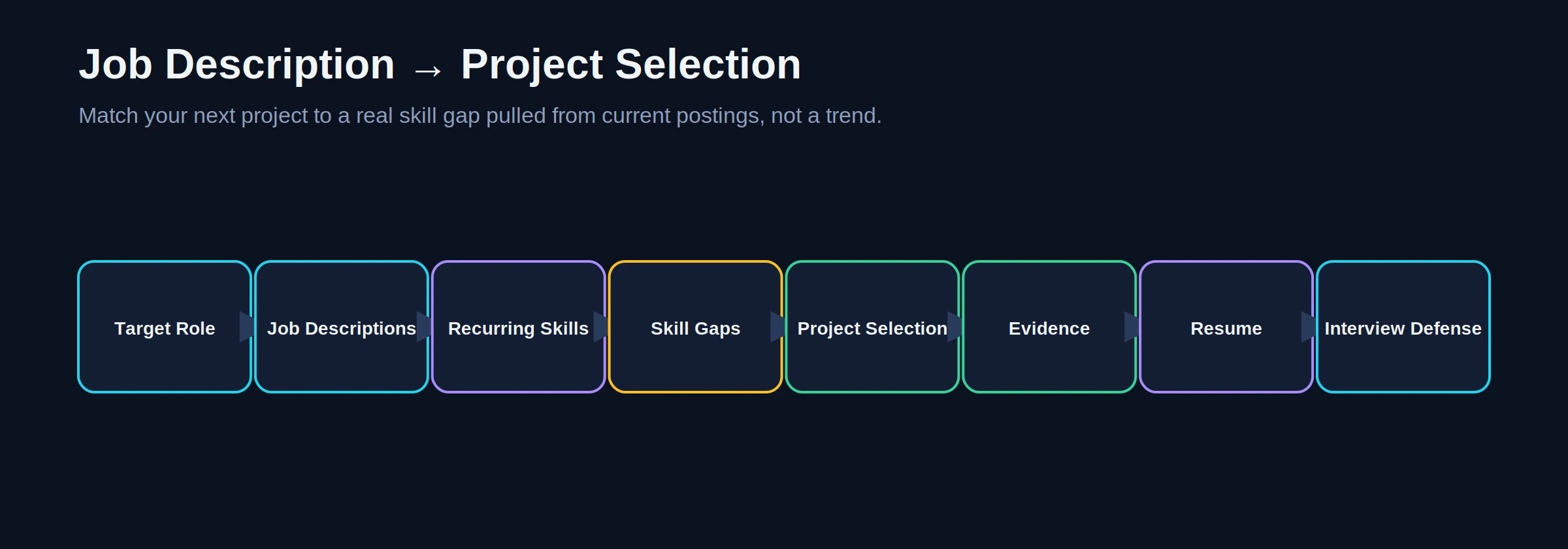
Rather than building projects and hoping they’re relevant, pull five to ten current postings for the specific role you want, list the skills that recur across all of them, compare that list against what your current portfolio already demonstrates, and build the next project to close the largest gap not to add another logo.
There’s no fixed number of postings you must review, but relying on a single company’s listing risks over-fitting to one team’s idiosyncratic requirements.
Project-to-Skill Matrix
| Project | Linux | Git | Scripting | CI/CD | Cloud | Docker | Kubernetes | IaC | Monitoring | Security |
|---|---|---|---|---|---|---|---|---|---|---|
| 1. Automated Deployment Pipeline | Medium | High | Medium | High | Medium | Optional | Optional | Optional | Optional | Medium |
| 2. Containerized App + Registry CI | Medium | High | Medium | High | Optional | High | Optional | Optional | Optional | Medium |
| 3. Terraform Cloud Infrastructure | Medium | High | Medium | High | High | Optional | Optional | High | Medium | High |
| 4. Kubernetes + Observability + DevSecOps | High | High | High | High | High | High | High | Medium | High | High |
IQLancer Project Quality Scorecard
This is an IQLancer self-assessment framework, not an industry-standard recruiter scoring system. Score each project 1–5 honestly before publishing it.
A project scoring mostly 4s and 5s is ready to show. A project scoring mostly 1s and 2s on Security, Failure Handling, or Documentation is still valuable as a learning exercise but isn’t yet strong portfolio evidence strengthen those dimensions before publishing.
Portfolio Red Flags
| Red Flag | Why It Matters | How to Fix It |
|---|---|---|
| Tutorial clone with no changes | Reviewer recognizes the template instantly; proves nothing | Change the problem, architecture, or scope meaningfully |
| Tool collecting, no clear problem | Suggests checklist-driven learning, not engineering judgment | State the problem in the README before listing tools |
| No README or setup instructions | Reviewer can’t evaluate reproducibility | Write the full README structure outlined below |
| No security consideration | Signals a blind spot employers actively screen for | Add secrets management, least privilege, and scanning |
| No failure or recovery story | Suggests the system was never actually tested under stress | Deliberately break it and document the recovery |
| Repository can’t be reproduced | Undermines everything else in the project | Test the setup instructions on a clean environment |
| Candidate can’t explain their own code | Immediately ends interview credibility | Only ship what you can explain and defend unaided |
| Claiming lab work as professional production experience | Misleading, and easily exposed by follow-up questions | Label local/cloud lab work honestly as lab work |
Honest Experience Rule
Say what you actually did. Honest: “Built a Kubernetes deployment in a personal cloud lab, including a documented pod-failure recovery drill.” Misleading: “Managed production Kubernetes infrastructure” unless that reflects genuine professional responsibility. Interviewers ask follow-up questions specifically designed to expose this gap, and an honest lab-scale project defended well outperforms an inflated claim that collapses under one follow-up question.
DevOps Portfolio Checklist
Not every project needs every item but across your full portfolio, most of these should appear somewhere:
- [ ] Linux fundamentals
- [ ] Git-based workflow
- [ ] Scripting (Bash/Python)
- [ ] CI/CD pipeline
- [ ] Cloud provider usage
- [ ] Docker
- [ ] Kubernetes
- [ ] Infrastructure as Code
- [ ] Monitoring
- [ ] Logging
- [ ] Security (secrets, least privilege, scanning)
- [ ] Networking basics
- [ ] Automation over manual steps
- [ ] Troubleshooting evidence
- [ ] Well-structured GitHub repository
- [ ] Documentation explaining decisions
- [ ] Reproducibility (another engineer can rebuild it)
- [ ] At least one documented failure/recovery scenario
- [ ] Interview-ready explanation for every major decision
Conclusion
Devops projects earn attention when they read as engineering evidence rather than tool exposure a real problem, a reasoned architecture, automation instead of manual steps, and a documented failure that was actually handled. Three or four projects built this way, each with clean CI/CD, sensible security, real monitoring, and an honest README, will outperform a longer list of shallow repositories every time a reviewer actually looks closely. Before publishing your next project, run it through the IQLancer Quality Scorecard, pull a handful of current postings for the role you want, and close the gap those postings reveal. That’s the next practical step pick one project above, and build it as evidence, not decoration.