Finishing an AWS tutorial and deploying an application are not the same achievement. A tutorial proves you can follow instructions. A project proves you can make decisions which service to use, how to secure it, how to know if it’s working, and what it costs to run. That distinction is why cloud engineer projects matter more than certificates alone: they are the evidence layer between what you’ve learned and what you can actually do on the job.
IQlancer roadmap walks through how to identify the cloud skills employers currently ask for, how to pick projects that close your specific skill gaps, how to build and secure them properly, and how to turn that work into GitHub evidence, resume lines, and answers you can defend in an interview.
What Makes a Cloud Project Worth Building?
Not every hands-on cloud exercise belongs on a resume. Before choosing what to build, it helps to understand the difference between a lab you complete for yourself and a project designed to be evidence for someone else.
There’s a meaningful difference between four things people often lump together:
| Type | What It Proves | Typical Limitation |
|---|---|---|
| Cloud Lab | You can follow a guided exercise | No independent decision-making shown |
| Tutorial Project | You can replicate a tutorial’s steps | Identical to thousands of other portfolios |
| Portfolio Project | You made engineering decisions and can explain them | Requires documentation to be visible as evidence |
| Production-Like Project | You handled security, monitoring, and failure scenarios realistically | Still not real production should never be described as such |
A portfolio project earns its place in a job search only when it demonstrates a full chain of decisions, not just a working deployment. That chain is: a clear problem, an architecture that solves it, deliberate technology decisions, working implementation, applied security, validation that it works, monitoring that reveals health, documentation that lets someone else understand it, published evidence, and lessons learned from what went wrong.
IQLancer recommendation: a project using four services with a clear justification for each one is stronger evidence than a project using fifteen services where the reasoning isn’t visible. Hiring managers scanning a GitHub repo are looking for judgment, not a service inventory.
What Cloud Skills Do Beginner Jobs Actually Ask For?
Before choosing a project, it’s worth knowing what beginner and junior cloud roles are actually asking for right now, rather than guessing based on what looks impressive to learn. This section separates recurring requirements from role-specific and advanced ones.
Current market observation: across junior and entry-level cloud engineer, cloud support, and junior DevOps postings on major job boards in 2026, a consistent core keeps appearing: Linux fundamentals, basic networking, AWS core services (EC2, S3, IAM, Lambda), scripting, and version control with Git often alongside an entry-level credential such as the AWS Certified Cloud Practitioner and growing expectations around infrastructure-as-code tools like Terraform or CloudFormation.
Familiarity with AWS services like EC2, S3, and Lambda, infrastructure-as-code tools such as CloudFormation or Terraform, and version control systems like Git is typically required for junior AWS cloud engineer roles (ZipRecruiter). Postings targeting government-adjacent and regulated environments frequently emphasize strong Linux administration skills and scripting proficiency as a baseline expectation (Glassdoor listings).
A widely-read 2026 practitioner roadmap makes a point worth internalizing early: the most common reason beginners fail cloud engineer interviews isn’t an inability to configure a service; it’s an inability to explain why two services can’t communicate, which almost always comes down to a networking gap (DEV Community).
| Category | Skills | Frequency |
|---|---|---|
| Common | Linux fundamentals, cloud computing basics, EC2/compute, S3/storage, IAM basics, Git | Appears in almost every posting |
| Frequently Requested | VPC/networking, scripting (Python or Bash), CloudWatch/monitoring basics, RDS/databases | Appears in most postings |
| Role-Specific | Terraform/CloudFormation, Docker, CI/CD pipelines, cost management, DNS/Route 53 | Depends on the specific team and stack |
| Advanced / Differentiating | Kubernetes, multi-account/multi-region design, DevSecOps automation, FinOps tooling | Appears mainly in mid-level and senior postings, or as a “nice to have” for juniors |
IQLancer recommendation: do not treat any single job posting as universal. Pull 10-20 postings for your actual target role and location before deciding what to learn next the pattern across postings is more reliable than any individual listing.
How to Choose a Project From a Real Job Description
Picking a project because it sounds advanced is a common beginner mistake. This section shows how to reverse-engineer project ideas from actual job postings so that each project closes a gap that’s actually blocking you from a specific role.
IQLancer Framework Job Requirement to Evidence Pipeline:
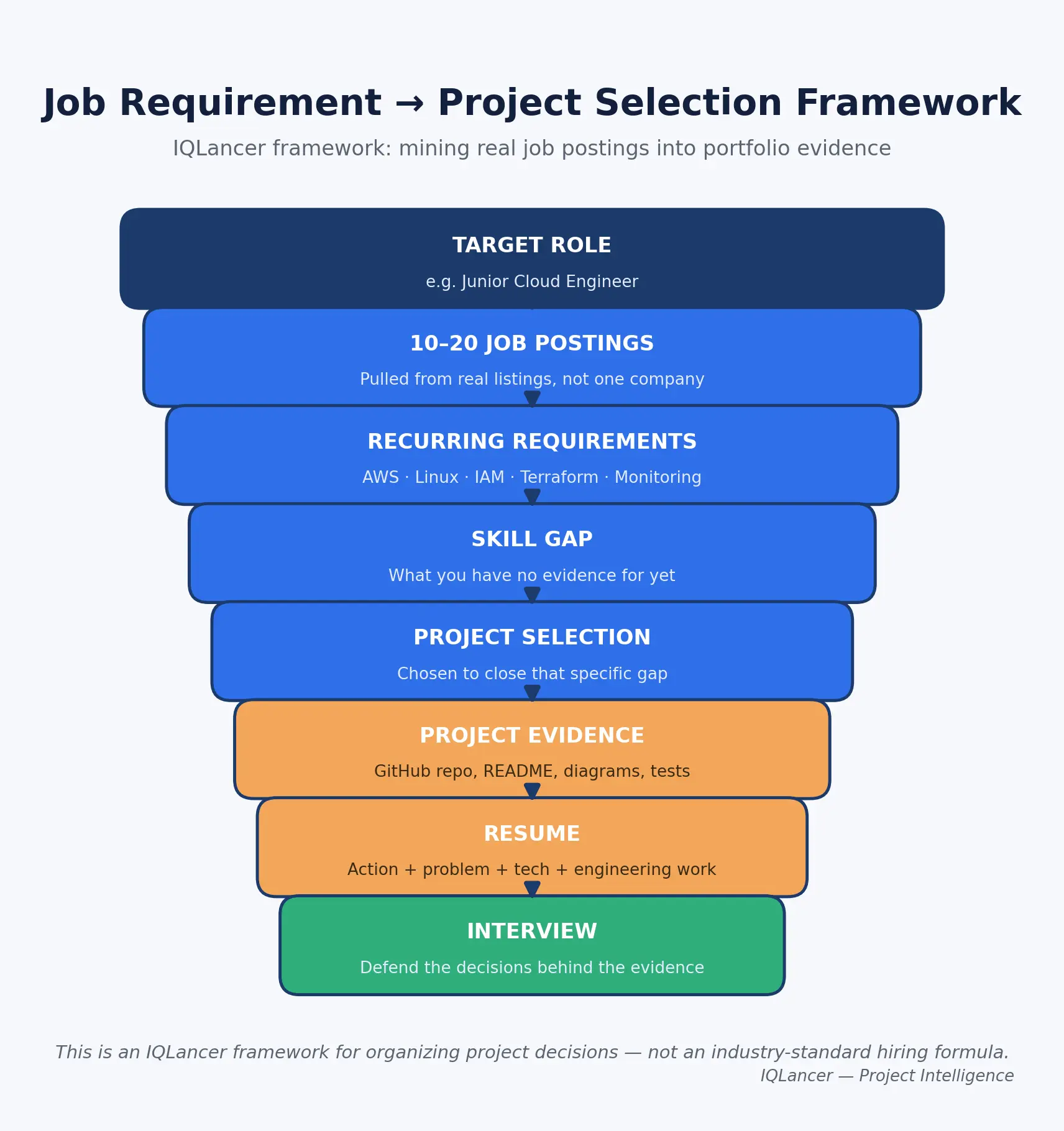
This is an IQLancer framework, not an industry-standard hiring methodology; it’s a practical way to organize your own learning decisions around real market signal instead of guesswork.
Worked example: Suppose you collect 15 postings for “Junior Cloud Engineer” in your target market, and AWS, Linux, IAM, and Terraform show up in most of them, with Docker and CloudWatch appearing frequently but not universally. A static website hosted on S3 demonstrates almost none of that list; it barely touches IAM and doesn’t touch Terraform, Linux, or monitoring at all.
A Terraform-managed AWS application environment with IAM roles, a monitored EC2 or Lambda workload, and documented security decisions demonstrates four to five of the recurring requirements at once. That doesn’t guarantee an interview or an offer no single project does but it produces stronger, more relevant evidence for that specific set of job postings.
Job Requirement → Project Opportunity Matrix
| Requirement | Frequency | Project Opportunity | Evidence Produced |
|---|---|---|---|
| AWS core services | Very high | Any AWS-based project | Working deployment, architecture diagram |
| Linux | High | EC2-based deployment, SSH administration, log inspection | Shell history, scripts, troubleshooting notes |
| IAM | High | Any project with least-privilege roles instead of root/admin access | IAM policy JSON, role diagrams |
| Networking/VPC | Moderate-High | Custom VPC project, load-balanced app | VPC diagram, security group rules |
| Terraform/IaC | Moderate-High | Any project rebuilt with Terraform | .tf files, state management notes |
| Monitoring | Moderate | Alerting layer added to any project | Dashboard screenshots, alert configuration |
| Docker | Moderate | Containerized deployment of an existing project | Dockerfile, container registry evidence |
| CI/CD | Moderate | Automated deployment pipeline for any project | Pipeline configuration, deployment logs |
Project selection rule: choose projects because they close a documented skill gap against your target roles not because a project looks impressive in isolation.
Minimum Viable Cloud Portfolio
A common and unhelpful piece of advice is to tell every beginner to build seven to nine projects. Portfolio size should depend on where you’re starting from and what you’re trying to prove, not on a fixed number.
| Starting Point | Recommended Portfolio | Reasoning |
|---|---|---|
| Starting from zero | 3 strong projects | Enough to cover compute, storage, and security/networking fundamentals with real depth |
| Targeting a junior cloud role | 3-4 strong projects | Should collectively cover the “Common” and most “Frequently Requested” skills from Section 2 |
| Career switcher | Projects targeted at the specific gaps between your current skills and the target job’s recurring requirements | Generic projects waste time an experienced switcher doesn’t have |
IQLancer recommendation: three excellent, deeply documented projects consistently outperform ten shallow ones, because the difference-maker in a portfolio review or interview is depth of understanding, not project count. A recruiter or hiring manager can only meaningfully evaluate a handful of projects anyway make those few count.
The IQLancer Project Depth Ladder
Rather than treating every project as a one-time build, it helps to see a single project as something that can grow in sophistication over time which is often a stronger signal than starting five unrelated projects.
This is an IQLancer framework, not an industry-standard maturity model:
| Level | Focus | What It Adds |
|---|---|---|
| 1. Deploy | Get it running | Basic working deployment |
| 2. Automate | Remove manual steps | Scripts or IaC replacing console clicks |
| 3. Secure | Reduce attack surface | IAM least privilege, network controls, encryption |
| 4. Observe | Know its health | Monitoring, logging, alerting |
| 5. Recover | Handle failure | Backup, rollback, recovery testing |
| 6. Optimize | Control cost and performance | Right-sizing, cleanup automation, cost alerts |
One Project, Multiple Versions Worked Example
A single basic web application can evolve through the ladder instead of being abandoned after Level 1:
- Version 1: Deploy the app on a single EC2 instance with a public IP.
- Version 2: Replace root/admin access with an IAM role scoped to only what the app needs; restrict inbound traffic with a security group.
- Version 3: Add CloudWatch metrics and an alarm for CPU and instance health.
- Version 4: Put the instance behind an Application Load Balancer with a second instance for redundancy.
- Version 5: Rebuild the entire environment using Terraform instead of manual console steps.
- Version 6: Add a CI/CD pipeline that deploys on every code push.
- Version 7: Simulate an instance failure and document detection, recovery time, and what you’d change.
IQLancer recommendation: for most beginners, evolving one project through several versions produces a more coherent, defensible portfolio than building many disconnected projects because you can speak to why each layer was added, in order, which is exactly what interviewers probe for.
What Beginners Should NOT Build First
Some technologies are magnets for beginners precisely because they look advanced on a resume but starting there usually produces a shallow, hard-to-defend project instead of a strong one.
| Technology | Why It’s Attractive | Why It’s Often Premature | Learn First |
|---|---|---|---|
| Kubernetes | Heavily discussed, seen as “real DevOps” | Most beginners can’t yet explain what problem it solves versus a simpler deployment | Docker fundamentals, a single-container deployment, load balancing basics |
| Multi-region architecture | Sounds enterprise-grade | Adds latency, replication, and failover complexity most beginners can’t yet troubleshoot | Single-region reliability, backups, monitoring |
| Multi-cloud systems | Signals broad exposure | Shallow multi-cloud knowledge is weaker evidence than depth in one provider | Deep, single-provider fundamentals |
| Complex microservices | Looks like “real-world” architecture | Debugging inter-service communication requires networking skills most beginners haven’t built yet | A well-secured monolithic or two-tier application |
| Service meshes | Trendy in senior-level content | Solves problems (traffic management across dozens of services) beginners don’t yet have | Basic VPC networking and load balancing |
| Enterprise-scale systems | Impressive-sounding scope | Impossible to build authentically as a solo personal-lab project | A correctly-scoped, well-documented smaller system |
None of these technologies are useless they’re simply sequencing problems. Building them prematurely usually results in a shallow implementation that falls apart under interview questioning, which does more damage than not attempting them at all.
Top Most Demanded 7 Detailed Cloud Project Blueprints
The following blueprints are built around AWS as the primary implementation example, since it remains the most broadly requested platform across entry-level cloud computing projects and AWS projects in current job postings. Each blueprint below is one of several strong AWS project ideas for a beginner portfolio but the pattern (problem → architecture → security → evidence) applies whether you’re using AWS, Azure, or Google Cloud.
Project 1 Static Website Hosting with Global Delivery
Difficulty: Beginner Best For: Complete beginners with no cloud deployment experience Target Roles: Cloud Support, Cloud Operations, Junior Cloud Engineer
Engineering Problem: A static site needs to be available globally, load quickly, and survive traffic spikes without a server to maintain or patch.
Why Build It: It’s the cleanest entry point into cloud storage, content delivery, DNS, and IAM bucket policies without compute or networking complexity getting in the way.
What You Will Build: A static website stored in object storage, served globally through a content delivery network, with a custom domain and HTTPS.
Architecture:
User → DNS (Route 53) → CDN (CloudFront) → Object Storage (S3, private)
Cloud Provider: AWS Services Used: S3, CloudFront, Route 53, AWS Certificate Manager, IAM Why These Services: S3 stores static assets durably and cheaply. CloudFront caches content at edge locations to reduce latency and offload origin requests. Route 53 provides DNS resolution to a custom domain. Certificate Manager issues a free TLS certificate so the site is served over HTTPS rather than plain HTTP. Alternatives: Azure Static Web Apps or Google Cloud Storage + Cloud CDN follow the same pattern on other providers.
Prerequisites: Basic HTML/CSS, a registered domain (optional), an AWS account.
Implementation Blueprint:
- Create a private S3 bucket (not public) intended to hold your site’s files.
- Upload your site’s HTML, CSS, and JS assets to the bucket.
- Create a CloudFront distribution with the S3 bucket as its origin, using Origin Access Control so the bucket stays private and only CloudFront can read it.
- Request a public TLS certificate in AWS Certificate Manager for your custom domain.
- Attach the certificate to the CloudFront distribution and configure the domain alias.
- Create a Route 53 hosted zone and point an A/ALIAS record at the CloudFront distribution.
- Test the site over HTTPS using the custom domain, not the raw CloudFront URL.
Security: Keep the S3 bucket private and reachable only through CloudFront’s Origin Access Control never enable public bucket access to serve static content. Enforce HTTPS-only viewer requests in CloudFront so HTTP requests redirect rather than serve content unencrypted.
Networking: No VPC is required for this project; the relevant networking concept here is DNS resolution and CDN edge routing rather than private networking.
Testing + Validation: Confirm the site loads over HTTPS on the custom domain, confirm the raw S3 URL is not publicly accessible, and confirm cache invalidation works after you update a file.
Monitoring: Enable CloudFront access logs and watch the 4xx/5xx error rate a spike usually means a broken origin reference or a misconfigured cache behavior, not a capacity problem, which is a useful distinction to be able to explain.
Failure Scenarios: Origin becomes unreachable (bucket policy misconfigured), certificate expires or fails validation, DNS record points to the wrong distribution.
Troubleshooting: Detect via elevated error rate in CloudFront logs → investigate bucket policy and Origin Access Control settings → fix the policy → verify with a fresh browser request (bypassing cache).
Recovery: Because content is static and versioned in Git, recovery is a redeploy from source. This is a good place to explain why version control matters even for infrastructure-adjacent work.
Cost Awareness: S3 storage and CloudFront requests both fall within AWS’s free-tier allowances for low-traffic personal projects, but AWS changed its Free Tier structure for accounts created on or after July 15, 2025, so confirm which model applies to your account before assuming a service is free (Free Tier changes explainer). Set a low-threshold AWS Budget alert immediately, before deploying anything.
Local vs Cloud vs Production-Like: This is a legitimate small-scale production-like deployment; it can genuinely serve real traffic but it should never be described as “enterprise CDN experience.”
GitHub Evidence: README.md, site/ (source files), architecture/diagram.png, docs/deployment-steps.md.
README Requirements: Problem, objective, architecture diagram, services used and why, setup steps, deployment steps, HTTPS validation steps, cost notes, cleanup steps, lessons learned, limitations, future improvements.
Portfolio Evidence: Architecture diagram, screenshot of the live HTTPS site, CloudFront distribution configuration screenshot (with account IDs redacted).
Resume Evidence: “Deployed a globally-distributed static website using S3 and CloudFront, configured a private origin with Origin Access Control, and enforced HTTPS delivery via ACM and Route 53.”
Interview Defense:
- Why CloudFront instead of serving directly from S3? Tests understanding of latency, caching, and public exposure.
- Why is the bucket private? Tests security judgment around unnecessary public access.
- What happens if you update a file but the site still shows the old version? Tests understanding of CDN caching and invalidation.
- How would you add a contact form to a static site? Tests awareness of serverless patterns (a natural bridge to Project 4).
- What would this cost at 100,000 monthly visitors? Tests cost estimation reasoning, not memorized numbers.
Skills Demonstrated: Cloud storage (High), CDN/networking concepts (High), DNS (Medium), IAM/security (Medium), cost awareness (Medium), compute (None – intentionally).
Hiring Signal: Evidence of basic cloud fundamentals and security-conscious defaults useful as a first project, but insufficient alone for a job application.
Common Mistakes: Making the S3 bucket public instead of using Origin Access Control; forgetting to invalidate the CloudFront cache after updates; not setting a budget alert before deploying; treating this as a complete portfolio on its own.
Upgrade Path: Add a serverless contact-form backend (bridges into Project 4), or add IaC by rebuilding the same stack in Terraform (bridges into Project 7).
Project 2 Cloud VM Application Deployment
Difficulty: Beginner Best For: Beginners ready to work with compute, Linux, and network access controls directly Target Roles: Cloud Engineer, Cloud Support, Cloud Operations, Junior DevOps
Engineering Problem: An application needs a running server environment that is reachable by users but not wide open to the internet, and someone needs to be able to log in, patch it, and diagnose it when something breaks.
Why Build It: This is where most beginner interview failures originate; it directly builds the Linux and networking skills that current job postings request most consistently (DEV Community roadmap).
What You Will Build: A web application running on a virtual machine, reachable over HTTP/HTTPS, administered over SSH with key-based access only, monitored for basic health.
Architecture:
User → Internet Gateway → EC2 instance (public subnet) → Application process → CloudWatch
Cloud Provider: AWS Services Used: EC2, VPC (default or simple custom), Security Groups, IAM, CloudWatch Why These Services: EC2 provides a full Linux environment, which is the fastest way to build real administration skills. Security Groups act as a stateful firewall controlling exactly which ports are reachable. IAM roles (rather than long-lived access keys) let the instance call other AWS services safely if needed. Alternatives: Azure Virtual Machines or Google Compute Engine follow the same conceptual pattern.
Prerequisites: Basic Linux command line, SSH familiarity, a simple application to deploy (even a basic Node.js, Python, or static app server).
Implementation Blueprint:
- Launch a free-tier-eligible EC2 instance running a current Linux distribution.
- Create a key pair for SSH access and disable password-based login entirely.
- Configure a security group that allows SSH only from your own IP address and HTTP/HTTPS from anywhere.
- Connect over SSH, update the OS packages, and install your application’s runtime.
- Deploy your application and configure it to run as a persistent service (not just a foreground process that dies when you disconnect).
- Confirm the application is reachable over the instance’s public IP or DNS name.
- Create an IAM role for the instance (instead of storing access keys on the box) if the app needs to call any other AWS service.
- Enable a basic CloudWatch alarm on CPU utilization.
Security: SSH restricted to your IP only, key-based authentication with password login disabled, no long-lived IAM access keys stored on the instance, security group rules scoped to only the ports the application actually needs.
Networking: Security group configuration is the core lesson here understand the difference between a security group (stateful, instance-level) and a network ACL (stateless, subnet-level), even in a default VPC setup.
Testing + Validation: Confirm the app is reachable over HTTP from an external network; confirm SSH fails from an IP that isn’t yours; confirm the app survives an SSH disconnect (proving it’s running as a service, not a foreground process).
Monitoring: Track CPU utilization (reveals load or a runaway process), instance status checks (reveals underlying hardware or network issues), and disk usage (reveals log files filling the volume) and be able to explain what each metric would actually tell you if it alarmed.
Failure Scenarios: Application crashes and doesn’t restart, disk fills up from logs, security group misconfiguration locks out SSH access.
Troubleshooting: Detect via CloudWatch alarm or failed health check → investigate via SSH and application/system logs → fix (restart service, clear disk, correct the security group) → verify with a fresh external request.
Recovery: Take an AMI snapshot after a stable configuration so the instance can be rebuilt without redoing every manual step and use this to explain the gap that IaC (Project 7) later closes.
Cost Awareness: Use a free-tier-eligible instance type, terminate (not just stop) the instance when you’re done experimenting since a stopped instance’s attached EBS volume still bills, and set a budget alert before you start.
Local vs Cloud vs Production-Like: A genuine small-scale deployment, but describe it honestly as a “personal cloud lab,” not production experience, unless you actually operated it for real users.
GitHub Evidence: README.md, scripts/setup.sh (documenting exact setup commands), architecture/diagram.png, docs/troubleshooting-notes.md.
README Requirements: Problem, objective, architecture, services and why, prerequisites, setup, deployment, testing, security decisions, monitoring, cost, cleanup, lessons learned, limitations, future improvements.
Portfolio Evidence: Architecture diagram, terminal screenshot of a successful SSH session and service status, CloudWatch dashboard screenshot.
Resume Evidence: “Deployed and secured a Linux-based web application on AWS EC2, restricting administrative access via SSH key authentication and scoped security groups, and configured CloudWatch monitoring for instance health.”
Interview Defense:
- Why did you restrict SSH to your IP instead of leaving it open? Tests security judgment about unnecessary exposure.
- What’s the difference between stopping and terminating an instance? Tests operational and cost awareness.
- How would you know if the application crashed at 3am? Tests monitoring/alerting understanding.
- What would you change before letting real users hit this? Tests production-readiness thinking.
- Why use an IAM role instead of access keys on the instance? Tests credential management judgment.
Skills Demonstrated: Compute (High), Linux (High), networking/security groups (High), IAM (Medium), monitoring (Medium), cost awareness (Medium).
Hiring Signal: Evidence of hands-on Linux administration and network access control one of the strongest single signals for junior cloud and cloud support roles.
Common Mistakes: Leaving SSH open to 0.0.0.0/0; running the app as a foreground process instead of a service; forgetting to terminate the instance; never checking CloudWatch after setup.
Upgrade Path: Add a load balancer and a second instance (Project 6), or rebuild with Terraform (Project 7).
Project 3 Secure Cloud Storage System
Difficulty: Beginner-Intermediate Best For: Beginners who want to go deeper on IAM and data protection specifically Target Roles: Cloud Engineer, Cloud Security-adjacent roles, Cloud Support
Engineering Problem: An application or team needs to store files with different sensitivity levels, ensuring only the right identities can read or write specific objects, with encryption and an audit trail.
Why Build It: IAM appears as a “high frequency” requirement across current junior postings, but most beginner projects only touch it superficially. This project makes IAM the central skill being demonstrated rather than an afterthought.
What You Will Build: A multi-bucket storage system with distinct access policies per bucket, encryption at rest, versioning, and logging of access attempts.
Architecture:
IAM Users/Roles → IAM Policies → S3 Buckets (encrypted, versioned) → CloudTrail (audit log)
Cloud Provider: AWS Services Used: S3, IAM, AWS KMS, CloudTrail Why These Services: S3 provides object storage with fine-grained bucket and object policies. IAM lets you model realistic access scenarios (a “read-only” role versus an “upload” role). KMS provides server-side encryption with customer-managed keys instead of relying only on defaults. CloudTrail records who accessed what, which is the audit trail most tutorials skip entirely. Alternatives: Azure Blob Storage with Azure RBAC, or Google Cloud Storage with Cloud IAM, follow the same conceptual model.
Prerequisites: Completion of Project 1 or 2 (basic IAM exposure), understanding of JSON syntax for policy documents.
Implementation Blueprint:
- Create two or three S3 buckets representing different sensitivity levels (for example:
public-assets,internal-docs,sensitive-records). - Enable versioning and default encryption (SSE-KMS) on each bucket.
- Create a KMS key with a key policy that only grants use to specific IAM roles.
- Create at least two IAM roles: one with read-only access to
internal-docs, another with read/write access tosensitive-recordsbut explicitly denied delete permissions. - Write and attach least-privilege IAM policies (following the AWS Well-Architected Framework’s guidance to grant only the access an identity actually requires) rather than using AmazonS3FullAccess (AWS Well-Architected Framework, SEC03-BP02).
- Enable CloudTrail logging for the account (or the relevant buckets) to capture access events.
- Test each role by assuming it and confirming it can only perform the actions it was granted.
- Attempt an action each role should be denied, and confirm it is actually denied (not just untested).
Security: Least-privilege IAM policies scoped to specific resources and actions, encryption at rest via KMS, versioning to protect against accidental overwrite or deletion, block-public-access enabled account-wide unless a bucket is intentionally public (as in Project 1).
Networking: Not the focus of this project; if used alongside a VPC-based application, S3 access can optionally be routed through a VPC Gateway Endpoint to avoid traffic leaving the private network worth mentioning as a future improvement even if not implemented.
Testing + Validation: For each IAM role, explicitly test both the allowed action (should succeed) and a denied action (should fail with an access-denied error) testing only the success path is a common and easily-caught gap.
Monitoring: Review CloudTrail logs for unexpected access patterns for example, a role being used from an unfamiliar IP, or repeated denied requests, which could indicate misconfiguration or a credential problem.
Failure Scenarios: Overly broad IAM policy accidentally grants more access than intended, KMS key policy blocks legitimate access, object accidentally deleted without versioning enabled.
Troubleshooting: Detect via a failed action or an unexpected CloudTrail entry → investigate the specific policy statement and KMS key policy → correct the JSON policy → re-test both allow and deny cases.
Recovery: Demonstrate recovering a deleted or overwritten object using S3 versioning this is one of the more concrete, demonstrable “recovery” stories available to a beginner.
Cost Awareness: S3 storage and requests at this scale stay within free-tier or near-free-tier allowances; KMS has a small per-key monthly cost and per-request charges, so document that trade-off honestly rather than presenting it as free.
Local vs Cloud vs Production-Like: A legitimate demonstration of access-control modeling, but keep the honest framing: “modeled least-privilege access control in a personal AWS lab,” not “managed enterprise data governance.”
GitHub Evidence: README.md, iam-policies/*.json, architecture/access-model-diagram.png, docs/test-results.md.
README Requirements: Problem, objective, architecture, services and why, IAM design rationale, setup, deployment, security testing results (allow/deny), cost, cleanup, lessons learned, limitations, future improvements.
Portfolio Evidence: Access-model diagram showing roles and their permitted actions, screenshots of successful and denied test requests (credentials redacted), CloudTrail log excerpt.
Resume Evidence: “Designed and implemented a least-privilege IAM access model for a multi-tier S3 storage system, including KMS encryption, versioning, and CloudTrail audit logging, with documented allow/deny testing for each role.”
Interview Defense:
- Walk me through how you decided what each IAM role could do. Tests whether access design was deliberate or copied.
- What’s the difference between a bucket policy and an IAM policy, and when would you use each? Tests conceptual depth.
- How would you detect if a role’s credentials were compromised? Tests monitoring/audit thinking.
- Why use KMS instead of the default S3 encryption? Tests understanding of key management trade-offs.
- What would you do differently for a team of 20 people instead of just you? Tests scalability of thinking, not implementation.
Skills Demonstrated: IAM (High), security/encryption (High), storage (Medium), auditing/logging (Medium), cost awareness (Low-Medium).
Hiring Signal: Evidence of security-first thinking and IAM fluency a strong differentiator, since most beginner portfolios treat IAM superficially.
Common Mistakes: Testing only what a role can do and never what it’s denied; using overly broad policies “to make it work” and never tightening them; forgetting to enable versioning before testing recovery.
Upgrade Path: Add a Lambda function that processes uploaded files (bridges into Project 4) using the same access-control discipline.
Project 4 Serverless API
Difficulty: Beginner-Intermediate Best For: Beginners ready to move beyond always-on servers into event-driven compute Target Roles: Cloud Engineer, Junior DevOps, Backend-leaning Cloud roles
Engineering Problem: An application needs an API backend that scales automatically with demand and doesn’t require managing or patching a server that sits idle most of the time.
Why Build It: Serverless compute (Lambda) is explicitly named in current junior AWS postings alongside EC2 as a core expected skill (ZipRecruiter), and it demonstrates a fundamentally different operational model than Project 2.
What You Will Build: A REST API where each endpoint triggers a Lambda function that reads or writes data in DynamoDB.
Architecture:
User → API Gateway → Lambda function → DynamoDB → CloudWatch Logs
Cloud Provider: AWS Services Used: API Gateway, Lambda, DynamoDB, IAM, CloudWatch Why These Services: API Gateway handles HTTP routing, throttling, and request validation without custom server code. Lambda runs your logic only when invoked, eliminating idle compute cost. DynamoDB provides a managed NoSQL store that scales with the API without capacity planning. IAM roles grant each Lambda function only the specific DynamoDB actions it needs. Alternatives: Azure Functions with Cosmos DB, or Google Cloud Functions with Firestore, follow the same event-driven pattern.
Prerequisites: Basic scripting (Python or Node.js), understanding of REST concepts (GET/POST/PUT/DELETE), completion of Project 3 is helpful but not required.
Implementation Blueprint:
- Design the API’s endpoints (for example: create item, get item, list items, delete item) before writing any code.
- Create a DynamoDB table with an appropriate partition key for your data model.
- Write a Lambda function per endpoint (or one function with routing logic, depending on complexity you’re comfortable defending).
- Create an IAM execution role for the Lambda functions scoped only to the specific DynamoDB actions and table ARN they need not
DynamoDB:*. - Create an API Gateway REST or HTTP API and connect each route to its corresponding Lambda function.
- Deploy the API and test each endpoint with a tool like curl or Postman.
- Add basic input validation in the Lambda code to reject malformed requests instead of letting them fail silently.
- Enable CloudWatch Logs for each Lambda function.
Security: Scoped IAM execution roles per function (not a shared, overly broad role), input validation to prevent malformed or malicious payloads from reaching DynamoDB, API Gateway throttling to limit abuse, no secrets hard-coded in function code.
Networking: For a beginner project, Lambda functions can run outside a VPC unless they need to reach private resources understanding when a Lambda needs VPC access (and the added complexity that brings) is itself a useful piece of knowledge to be able to discuss.
Testing + Validation: Test each endpoint independently for both valid and invalid input; confirm the IAM role genuinely can’t perform actions outside its scope by testing an out-of-scope call and confirming it fails.
Monitoring: Track Lambda invocation errors and duration (reveals bugs or inefficient code), and API Gateway 4xx/5xx rates (reveals client errors versus backend failures) and be able to explain the difference between the two error categories.
Failure Scenarios: Lambda times out on a slow DynamoDB query, IAM role missing a required permission causes silent failures, API Gateway misconfigured CORS blocks legitimate frontend requests.
Troubleshooting: Detect via CloudWatch error metrics or a failed test call → investigate the specific Lambda’s logs → fix the code or IAM policy → re-test the exact failing request.
Recovery: Because Lambda is stateless and DynamoDB has point-in-time recovery available, document how you’d restore a table to a previous state even if you don’t fully implement it, being able to explain the option is valuable.
Cost Awareness: Lambda, API Gateway, and DynamoDB all offer meaningful always-free usage tiers well beyond typical portfolio traffic, but confirm current allowances for your account type since AWS’s Free Tier model changed for accounts created after July 15, 2025 (Free Tier 2026 overview). Set a budget alert regardless.
Local vs Cloud vs Production-Like: A realistic small-scale serverless API genuinely production-capable at low scale, but describe it as a personal project unless it served real traffic for real users.
GitHub Evidence: README.md, functions/*.py (or .js), iam/execution-role-policy.json, architecture/diagram.png, docs/api-reference.md.
README Requirements: Problem, objective, architecture, services and why, API reference (endpoints and example requests/responses), setup, deployment, testing, security, monitoring, cost, cleanup, lessons learned, limitations, future improvements.
Portfolio Evidence: Architecture diagram, example curl/Postman requests and responses, CloudWatch dashboard screenshot showing invocation metrics.
Resume Evidence: “Built a serverless REST API using API Gateway, Lambda, and DynamoDB, with scoped per-function IAM execution roles and CloudWatch monitoring for invocation errors and latency.”
Interview Defense:
- Why serverless instead of an EC2-based API here? Tests understanding of when event-driven compute makes sense.
- What happens if a Lambda function times out mid-write? Tests understanding of idempotency and failure handling.
- How did you scope the IAM role for each function? Tests least-privilege discipline in a compute context.
- How would you handle a sudden 10x traffic spike? Tests understanding of serverless auto-scaling versus EC2 scaling.
- What would break this API in production that isn’t obvious right now? Tests critical self-assessment, not just recall.
Skills Demonstrated: Serverless compute (High), IAM (Medium-High), databases (Medium), API design (Medium), monitoring (Medium), cost awareness (Medium).
Hiring Signal: Evidence of modern, event-driven cloud architecture thinking increasingly relevant as teams shift workloads away from always-on infrastructure.
Common Mistakes: Using a single overly broad IAM role for all functions; skipping input validation entirely; never testing failure paths, only the happy path; leaving functions with unnecessarily long timeout settings.
Upgrade Path: Add a CI/CD pipeline that deploys new function versions automatically (bridges into Project 7’s automation layer).
Project 5 Custom VPC Network Design
Difficulty: Intermediate Best For: Beginners who have completed at least one compute project and are ready to own networking directly Target Roles: Cloud Engineer, Cloud Network-adjacent roles, Junior DevOps
Engineering Problem: An application needs a network layout that separates public-facing components from private backend components, so that a database or internal service is never directly reachable from the internet.
Why Build It: Networking is a “frequently requested” skill across postings, and it’s the specific skill gap the DEV Community roadmap flags as the most common cause of junior interview failure (source).
What You Will Build: A custom VPC with public and private subnets across two availability zones, a NAT gateway for outbound-only private traffic, and a bastion host or Systems Manager Session Manager for secure private-instance access.
Architecture:
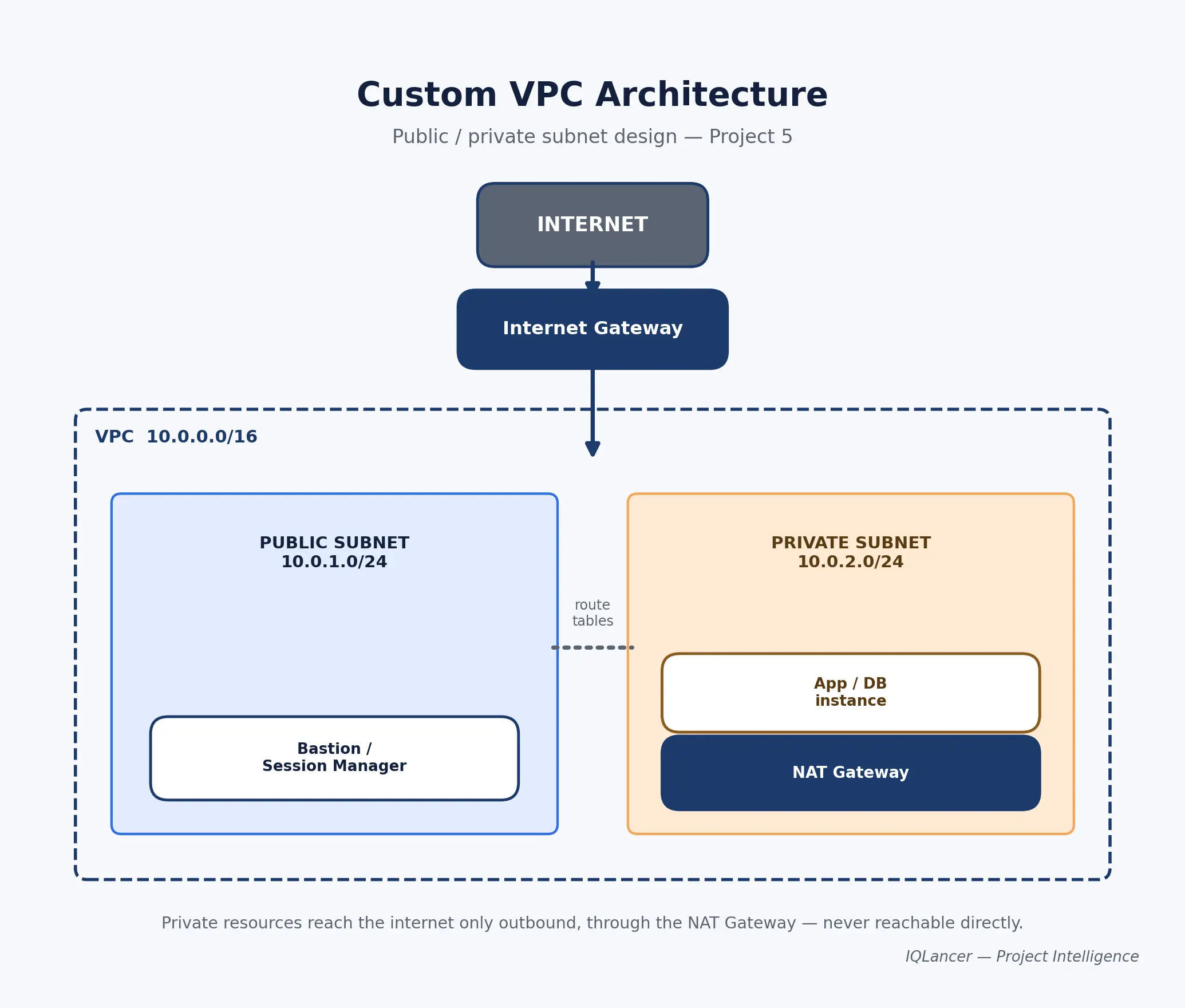
Internet Gateway → Public Subnet (bastion/ALB) → Private Subnet (app/database) → NAT Gateway (outbound only)
Cloud Provider: AWS Services Used: VPC, Subnets, Route Tables, Internet Gateway, NAT Gateway, Security Groups, EC2, IAM Why These Services: A custom VPC (instead of the default) forces you to design routing intentionally rather than inherit AWS’s defaults. Public/private subnet separation is the foundational pattern behind almost every real-world cloud architecture. A NAT Gateway lets private resources reach the internet for updates without being reachable from the internet. Alternatives: Azure Virtual Network with subnets and NSGs, or Google Cloud VPC with firewall rules, follow the same conceptual split.
Prerequisites: Completion of Project 2, comfort with basic networking terms (CIDR blocks, routing).
Implementation Blueprint:
- Design your CIDR range and subnet split on paper before creating anything (for example, a
/16VPC with/24public and private subnets in two availability zones). - Create the VPC and its subnets according to your design.
- Create and attach an Internet Gateway, then add a route in the public subnets’ route table pointing
0.0.0.0/0to it. - Create a NAT Gateway in a public subnet, then add a route in the private subnets’ route table pointing
0.0.0.0/0to the NAT Gateway. - Launch an instance in a private subnet with no public IP.
- Use AWS Systems Manager Session Manager (preferred, avoids exposing SSH) or a bastion host in the public subnet to reach the private instance.
- From the private instance, confirm it can reach the internet (for package updates) but is not reachable directly from the internet.
- Document the full routing design with a diagram.
Security: No direct internet access to private subnet resources, Session Manager preferred over a bastion host to avoid an additional SSH attack surface, security groups scoped per tier (public tier accepts HTTP/HTTPS, private tier only accepts traffic from the public tier’s security group).
Networking: This entire project is the networking lesson CIDR planning, route table behavior, the difference between a security group and a network ACL, and why NAT Gateways exist.
Testing + Validation: From the private instance, confirm outbound internet access works (e.g., a package update succeeds) and confirm no inbound connection from the public internet succeeds; from outside, confirm the private instance’s IP (if you have it) is unreachable.
Monitoring: VPC Flow Logs reveal what traffic is actually flowing (or being rejected) between subnets enable them and review a sample to confirm your route tables and security groups behave as designed, not just as intended.
Failure Scenarios: Route table missing a route to the NAT Gateway (private instance loses internet access), security group too permissive (private instance unintentionally reachable), NAT Gateway in the wrong (private) subnet.
Troubleshooting: Detect via a failed outbound connection or an unexpected inbound connection → investigate route tables and VPC Flow Logs → correct the routing or security group → re-test both directions.
Recovery: Document the exact steps to rebuild the VPC from scratch, which naturally motivates the Terraform version in Project 7.
Cost Awareness: NAT Gateways are one of the most commonly-forgotten cost sources in personal AWS labs because they bill hourly plus per-GB processed even when idle; this project is a good place to practice the discipline of deleting a NAT Gateway the moment you’re done testing (2026 Free Tier guide notes on NAT Gateway costs).
Local vs Cloud vs Production-Like: A legitimate, correctly-structured network design but a single-account personal lab, not a multi-account enterprise network.
GitHub Evidence: README.md, architecture/vpc-diagram.png, docs/routing-table-design.md, docs/flow-log-analysis.md.
README Requirements: Problem, objective, architecture and CIDR design, services and why, setup, deployment, testing (both directions), security, monitoring, cost (with explicit NAT Gateway cost note), cleanup, lessons learned, limitations, future improvements.
Portfolio Evidence: VPC/subnet/route table diagram, screenshot of a successful outbound test from the private instance, Flow Logs excerpt showing a rejected inbound attempt.
Resume Evidence: “Designed and built a custom AWS VPC with public/private subnet separation across two availability zones, configured NAT Gateway routing for outbound-only private access, and validated traffic behavior using VPC Flow Logs.”
Interview Defense:
- Why separate public and private subnets instead of putting everything in one? Tests fundamental network segmentation reasoning.
- What does a NAT Gateway actually do, and why not just give the private instance a public IP? Tests understanding of the exposure trade-off.
- How would you debug a private instance that can’t reach the internet? Tests systematic troubleshooting, not memorized answers.
- What’s the difference between a security group and a network ACL? Tests depth beyond surface-level configuration.
- How would this design change across two availability zones failing independently? Tests resilience thinking.
Skills Demonstrated: Networking/VPC (High), security (Medium-High), troubleshooting (High), IAM (Low-Medium), cost awareness (Medium).
Hiring Signal: Direct evidence against the most commonly cited junior cloud interview failure point; the ability to reason about network connectivity, not just configure services.
Common Mistakes: Placing the NAT Gateway in a private subnet (it needs to be in a public one); forgetting to delete the NAT Gateway after testing, leading to ongoing charges; using an SSH bastion when Session Manager would reduce exposed surface area; never actually testing the “should fail” direction.
Upgrade Path: Deploy Project 6 (load-balanced app) inside this VPC design, or rebuild the VPC itself in Terraform (Project 7).
Project 6 Load-Balanced, Auto-Scaled Web Application
Difficulty: Intermediate Best For: Beginners who’ve completed Projects 2 and 5 and want to demonstrate availability engineering Target Roles: Cloud Engineer, Cloud Operations, Junior DevOps/SRE-adjacent
Engineering Problem: A single server is a single point of failure and can’t absorb traffic beyond its own capacity the application needs to survive one instance failing and handle more load than one instance can serve.
Why Build It: This project demonstrates availability and scaling reasoning directly, extending Projects 2 and 5 rather than starting from zero consistent with the IQLancer Project Depth Ladder in Section 5.
What You Will Build: The same application from Project 2, now running across multiple instances in an Auto Scaling Group behind an Application Load Balancer, inside the VPC from Project 5.
Architecture:
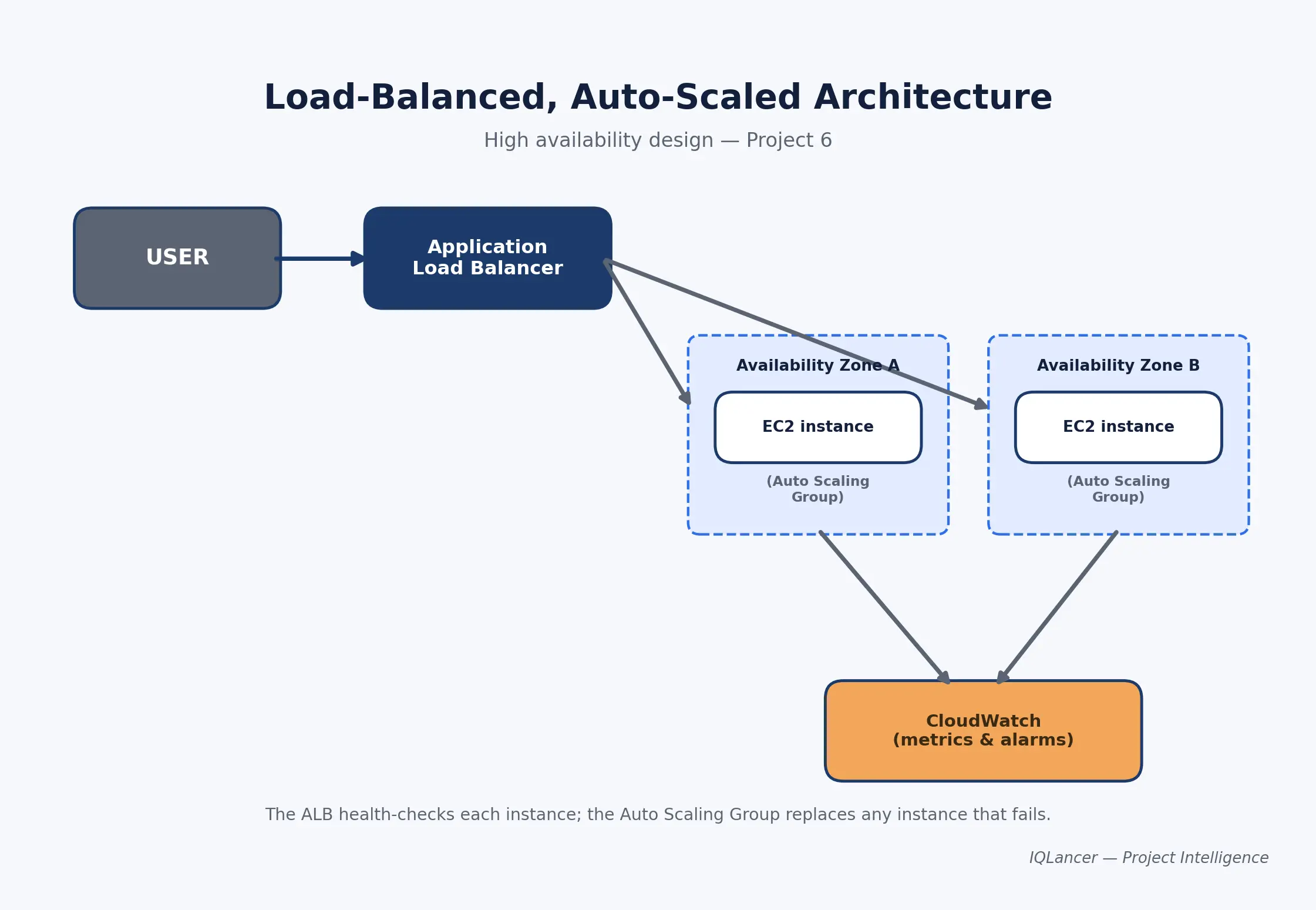
User → ALB (public subnets, multi-AZ) → Auto Scaling Group (private subnets) → CloudWatch
Cloud Provider: AWS Services Used: Application Load Balancer, Auto Scaling Group, EC2 Launch Template, VPC (from Project 5), CloudWatch Why These Services: An ALB distributes traffic across healthy instances and performs health checks, removing unhealthy instances from rotation automatically. An Auto Scaling Group maintains a target instance count and can scale based on demand, replacing the single-instance model from Project 2. Alternatives: Azure Load Balancer with a Virtual Machine Scale Set, or Google Cloud Load Balancing with a Managed Instance Group, follow the same pattern.
Prerequisites: Completion of Projects 2 and 5.
Implementation Blueprint:
- Create a Launch Template based on your Project 2 instance configuration, including a startup script that installs and starts the application automatically.
- Create an Auto Scaling Group using the Launch Template, spanning private subnets across two availability zones, with a minimum of two instances.
- Create an Application Load Balancer in the public subnets with a target group pointing at the Auto Scaling Group.
- Configure ALB health checks against a real application endpoint (not just “instance is running”) so unhealthy instances are actually detected and replaced.
- Confirm traffic reaches the app through the ALB’s DNS name.
- Terminate one instance manually and confirm the Auto Scaling Group replaces it and the ALB continues serving traffic without downtime.
- Add a CloudWatch-based scaling policy (for example, scale out when average CPU exceeds a defined threshold).
Security: Instances live in private subnets with no public IP, reachable only through the ALB; ALB security group accepts inbound HTTP/HTTPS from the internet, instance security group accepts traffic only from the ALB’s security group not from the internet directly.
Networking: This project directly exercises the public/private subnet split from Project 5, plus multi-AZ distribution, which is the core pattern behind real-world high availability.
Testing + Validation: Load-test with a simple tool to confirm traffic distributes across instances; manually terminate an instance and time how long it takes the ALB to stop routing to it and the Auto Scaling Group to replace it.
Monitoring: Track ALB target health (reveals how many instances are actually serving traffic right now), request count and latency (reveals load), and Auto Scaling Group activity history (reveals when and why scaling events happened) this combination is what separates “I deployed it” from “I know whether it’s healthy.”
Failure Scenarios: Health check pointing at the wrong path (marks healthy instances as unhealthy), Auto Scaling Group minimum set too low for real load, security group blocking ALB-to-instance traffic.
Troubleshooting: Detect via ALB target health going unhealthy or a scaling event that doesn’t resolve the issue → investigate health check configuration and instance logs → fix the health check path or security group → verify with sustained healthy target status.
Recovery: The manual instance-termination test in Step 6 is the recovery demonstration document; the actual time-to-recovery you observed, honestly, rather than an assumed number.
Cost Awareness: Running two or more always-on instances plus an ALB moves this project meaningfully beyond free-tier territory for as long as it’s running; the realistic cost discipline here is to build, test, screenshot the evidence, and then tear the entire stack down rather than leaving it running.
Local vs Cloud vs Production-Like: This is the most “production-like” project in the set, but it is still a personal lab test, not a system that has handled real user traffic at scale describe it that way.
GitHub Evidence: README.md, architecture/ha-diagram.png, docs/failover-test-results.md, launch-template/user-data.sh.
README Requirements: Problem, objective, architecture, services and why, prerequisites, setup, deployment, testing (including the manual failover test results), security, monitoring, cost (with an explicit note on always-on cost), cleanup, lessons learned, limitations, future improvements.
Portfolio Evidence: Architecture diagram, ALB target health screenshot before and after the manual failover test, Auto Scaling Group activity history screenshot.
Resume Evidence: “Built a highly available web application on AWS using an Application Load Balancer and Auto Scaling Group across multiple availability zones, and validated failover behavior by manually terminating an instance and measuring recovery time.”
Interview Defense:
- Walk me through what happens end-to-end when one of your instances fails. Tests real understanding versus memorized architecture.
- How did the ALB know an instance was unhealthy? Tests health check design comprehension.
- What’s the difference between scaling out and scaling up, and which did you use here? Tests scaling vocabulary and reasoning.
- How would you avoid downtime during a deployment, not just a failure? Tests thinking beyond the specific test performed (a natural bridge to CI/CD).
- What did this actually cost to run, and how did you control it? Tests honest cost awareness.
Skills Demonstrated: High availability design (High), networking (High), compute/scaling (High), monitoring (High), cost awareness (Medium), IAM (Low).
Hiring Signal: Strong evidence of availability and resilience thinking differentiates a candidate from one who has only deployed single-instance applications.
Common Mistakes: Leaving the stack running after testing (this is the most expensive project in the set if forgotten); pointing health checks at a path that doesn’t reflect real application health; setting Auto Scaling Group minimum/maximum values without a clear reason.
Upgrade Path: Add a CI/CD pipeline for zero-downtime deployments, or manage the entire stack with Terraform (Project 7).
Project 7 Infrastructure as Code Pipeline
Difficulty: Intermediate Best For: Beginners who’ve built at least one project manually and are ready to make it reproducible Target Roles: Cloud Engineer, Junior DevOps, Platform Engineering-adjacent roles
Engineering Problem: Manually-built infrastructure isn’t reproducible, isn’t version-controlled, and is easy to configure inconsistently across environments someone else (or future you) can’t reliably rebuild what you built by hand.
Why Build It: Terraform is now a “frequently requested” and increasingly baseline expectation across junior AWS postings, alongside CloudFormation (ZipRecruiter), and infrastructure-as-code is one of the clearest ways to demonstrate engineering maturity beyond console-clicking.
What You Will Build: A Terraform configuration that recreates one of your earlier projects (Project 2 is a good candidate) from scratch, with remote state storage and a basic CI pipeline that runs terraform plan on every change.
Architecture:
Git commit → CI pipeline → terraform plan/apply → AWS resources → Remote state (S3 + locking)
Cloud Provider: AWS Services Used: Terraform, S3 (remote state backend), IAM, a CI tool (e.g., GitHub Actions) Why These Services: Terraform state is the record Terraform uses to map your configuration to real-world resources, so it can plan changes accurately instead of guessing this is why state matters and shouldn’t be edited by hand or lost (HashiCorp Terraform documentation). Storing state remotely in S3 (rather than locally) allows the state to be shared safely and enables locking so two runs can’t corrupt it at the same time (HashiCorp remote state documentation). Alternatives: AWS CloudFormation or OpenTofu (an open-source Terraform fork) are viable alternatives depending on target employer preference.
Prerequisites: Completion of at least one prior project you’re rebuilding, basic Git usage.
Implementation Blueprint:
- Choose an existing project (Project 2 is recommended) and translate its resources into Terraform configuration files.
- Set up an S3 bucket (with versioning enabled) as a remote backend for Terraform state, rather than leaving state as a local file.
- Run
terraform init,terraform plan, and review the plan output carefully before applying anything. - Run
terraform applyand confirm the resulting infrastructure matches what you built manually in the original project. - Destroy the manually-built version (if still running) to avoid duplicate, conflicting resources and costs.
- Commit the Terraform configuration to Git, excluding any state file or secrets from version control.
- Set up a basic CI pipeline that runs
terraform planautomatically on every pull request, so changes are reviewed before being applied. - Document the exact variables someone else would need to change to deploy this in their own AWS account.
Security: Never commit .tfstate files or .tfvars files containing secrets to Git; use IAM roles scoped specifically to what Terraform needs to create and manage, not full administrator access; enable state locking so concurrent runs can’t corrupt the state.
Networking: No new networking concepts here the goal is reproducing prior networking decisions in code, not designing new ones.
Testing + Validation: Run terraform plan against a clean environment and confirm it proposes creating exactly the resources you expect, with no unexpected changes; after apply, manually verify the deployed resources match the original project’s behavior.
Monitoring: Not the primary focus of this project, but if Project 2’s CloudWatch alarm was included in the original build, confirm the Terraform version recreates it identically this is a good test of whether your IaC is actually complete, not partial.
Failure Scenarios: State file becomes out of sync with real infrastructure (someone made a manual change), a Terraform apply partially fails and leaves resources in an inconsistent state, secrets accidentally committed to version control.
Troubleshooting: Detect via a terraform plan showing unexpected drift → investigate what changed outside of Terraform → decide whether to import the manual change into state or revert it → re-run plan to confirm a clean, expected diff.
Recovery: Because everything is defined in code, “recovery” here means being able to terraform destroy and terraform apply from a clean slate and get back to the same working state demonstrate this explicitly rather than just claiming it works.
Cost Awareness: Terraform doesn’t change what a resource costs, only how it’s created the same cost discipline from the original project (budget alerts, cleanup, terminate-don’t-forget) still applies, and terraform destroy becomes your cleanup tool of choice.
Local vs Cloud vs Production-Like: A legitimate demonstration of infrastructure-as-code discipline at personal-lab scale avoid describing solo Terraform usage as “managed team infrastructure pipelines” unless that’s genuinely what happened.
GitHub Evidence: README.md, main.tf, variables.tf, outputs.tf, .github/workflows/plan.yml (or equivalent CI config), docs/state-management-notes.md with .gitignore explicitly excluding state files and variable files containing secrets.
README Requirements: Problem, objective, architecture, services and why, prerequisites, setup (including remote backend configuration), how to deploy, how to destroy, testing/validation approach, security notes (state and secrets handling), cost, lessons learned, limitations, future improvements.
Portfolio Evidence: terraform plan output screenshot showing a clean expected diff, CI pipeline run screenshot, architecture diagram noting this is the IaC version of an earlier manual project.
Resume Evidence: “Converted a manually-deployed AWS environment into version-controlled Terraform, configured a remote S3 backend with state locking, and added a CI pipeline that runs terraform plan on every pull request.”
Interview Defense:
- What is Terraform state, and why does it matter? Tests fundamental understanding, not just command familiarity.
- Why store state remotely instead of locally? Tests understanding of collaboration and locking.
- What would you do if
terraform planshowed unexpected changes you didn’t make? Tests drift-handling reasoning. - Why did you run
planin CI instead ofapply? Tests judgment about review gates before infrastructure changes. - What’s the risk of committing a
.tfstatefile to a public repository? Tests security awareness around exposed resource metadata.
Skills Demonstrated: Infrastructure as Code (High), automation (High), version control discipline (Medium-High), security (Medium), the underlying compute/networking skills from whichever project was converted (inherited).
Hiring Signal: Direct evidence of the specific IaC skill gap many job postings name explicitly and evidence that you understand why IaC matters, not just its syntax.
Common Mistakes: Committing state files or secrets to Git; never testing terraform destroy, only apply; using an overly broad IAM role for Terraform “to make it work”; treating the CI pipeline as optional rather than part of the actual evidence.
Upgrade Path: Extend the CI pipeline to run terraform apply automatically after manual approval, or convert a second project (like Project 5’s VPC) into the same Terraform codebase as a module.
Job Requirement → Project → Role Matrix
| Project | Core Skills Demonstrated | Target Role | Difficulty | Hiring Signal |
|---|---|---|---|---|
| Static Website Hosting | Storage, CDN, DNS | Cloud Support, Junior Cloud Engineer | Beginner | Cloud fundamentals baseline |
| Cloud VM Deployment | Linux, compute, security groups | Cloud Engineer, Cloud Support | Beginner | Core operational competency |
| Secure Cloud Storage | IAM, encryption, auditing | Cloud Engineer, Security-adjacent | Beginner-Intermediate | Security-first thinking |
| Serverless API | Event-driven compute, IAM, databases | Cloud Engineer, Junior DevOps | Beginner-Intermediate | Modern architecture fluency |
| Custom VPC Design | Networking, troubleshooting | Cloud Engineer, Network-adjacent | Intermediate | Addresses the top junior interview failure point |
| Load-Balanced App | Availability, scaling, monitoring | Cloud Engineer, Cloud Ops, SRE-adjacent | Intermediate | Resilience engineering evidence |
| Infrastructure as Code | Automation, reproducibility, IaC | Cloud Engineer, Junior DevOps | Intermediate | Closes one of the most commonly requested skill gaps |
AWS vs Azure vs Google Cloud :A Beginner’s Framing
Choosing a cloud provider matters less than developing depth in one. AWS offers the broadest ecosystem and shows up most consistently across general cloud engineer and cloud support postings. Azure carries particular weight in Microsoft-centric enterprise environments. Google Cloud shows up more selectively, often in cloud-native, data, and AI-adjacent teams. Cloud fundamentals IAM, networking, compute, storage, monitoring transfer across all three, which is why this roadmap uses AWS as the implementation example without treating multi-cloud breadth as a beginner priority. Shallow exposure to three providers is weaker evidence than real depth in one, and that depth is what an interviewer can actually probe.
Certifications vs. Projects
A certification proves structured learning and provides a credential; a project proves applied capability and produces evidence. Neither, on its own, guarantees an interview or an offer. IQLancer recommendation: treat a certification like the AWS Certified Cloud Practitioner or Solutions Architect Associate as a complement to projects, not a substitute the certification demonstrates you learned the material, and the project demonstrates you can apply it under real constraints like cost, security, and failure.
AI and Cloud Engineering in 2026
AI-assisted tooling is increasingly part of daily cloud engineering work assisting with infrastructure code, log analysis, troubleshooting, and documentation, and platform teams are actively building AI assistants into developer workflows as part of the broader 2026 platform engineering shift (LeanOps 2026 trends). That same shift is pairing engineering-led FinOps practices with infrastructure decisions, meaning cost accountability is increasingly treated as a first-class engineering responsibility rather than a finance-team afterthought (DZone, 2026 trends).
For a beginner, the practical takeaway is narrower: AI tools can help you write and troubleshoot infrastructure code faster, but they can also produce incorrect configurations, overly broad permissions, or commands that look plausible and aren’t the engineer remains responsible for validating and securing whatever gets deployed, regardless of what generated it.
How to Turn Projects Into GitHub Evidence
A project only becomes evidence once it’s structured for someone else to evaluate. Each blueprint above specifies its own GitHub structure, but the underlying claim-to-evidence discipline applies everywhere:
| Claim | Required Evidence |
|---|---|
| “Built Terraform infrastructure” | .tf files, README, architecture diagram, deployment instructions, state-handling explanation |
| “Secured the environment with least privilege” | Actual IAM policy JSON, documented allow/deny test results |
| “Monitored the application” | Dashboard screenshots, explanation of what each metric reveals |
| “Controlled costs” | Budget alert configuration, cleanup steps, honest cost notes in the README |
Never expose real credentials, account IDs, or secrets in a public repository redact them in screenshots and use .gitignore for any file containing sensitive values.
How to Turn Projects Into Resume Evidence
| Quality | Example |
|---|---|
| Weak | “Created AWS EC2 project.” |
| Better | “Deployed a web application on AWS using EC2 and configured secure network access and monitoring.” |
| Strong | “Deployed and secured a Linux-based web application on AWS EC2, restricting SSH access via scoped security groups and IAM roles, and configured CloudWatch monitoring for instance health.” |
A strong resume line combines the action, the problem, the architecture/technology, the engineering work performed, and a measured outcome only if genuinely available never a fabricated metric.
How to Defend Projects in Interviews
Beyond the project-specific questions listed in each blueprint, expect general questions that test judgment rather than recall:
- Why did you choose this architecture over alternatives? Tests decision-making, not memorization.
- How did you secure it? Tests whether security was deliberate or an afterthought.
- What happens if this component fails? Tests systems thinking.
- How would you scale this? Tests understanding of the current design’s limits.
- How would you monitor it in production? Tests operational maturity.
- How would you reduce the cost of running this? Tests cost awareness.
- What would you change before letting real users depend on this? Tests honest self-assessment.
- What actually failed while you were building it? Tests whether the story is genuine or rehearsed.
That last question matters more than it seems: genuine, specific failure stories are far more convincing than a polished narrative with no friction in it.
Project Stopping Criteria
Endless feature creep is not a sign of ambition; it’s usually a sign of unclear scope. A project is complete when:
- The core problem is genuinely solved
- The architecture is documented
- Security is implemented and tested
- Monitoring is meaningful, not decorative
- Testing has been completed, including failure paths
- The README is complete
- GitHub evidence is published and credential-free
- Costs are controlled and cleanup is documented
- Limitations are honestly documented
- You can explain every decision without notes
IQLancer Project Quality Score
This is an IQLancer self-assessment framework, not an industry-standard recruiter scoring system. Score each relevant area from 1 (absent) to 5 (strong) for any project before adding it to your portfolio:
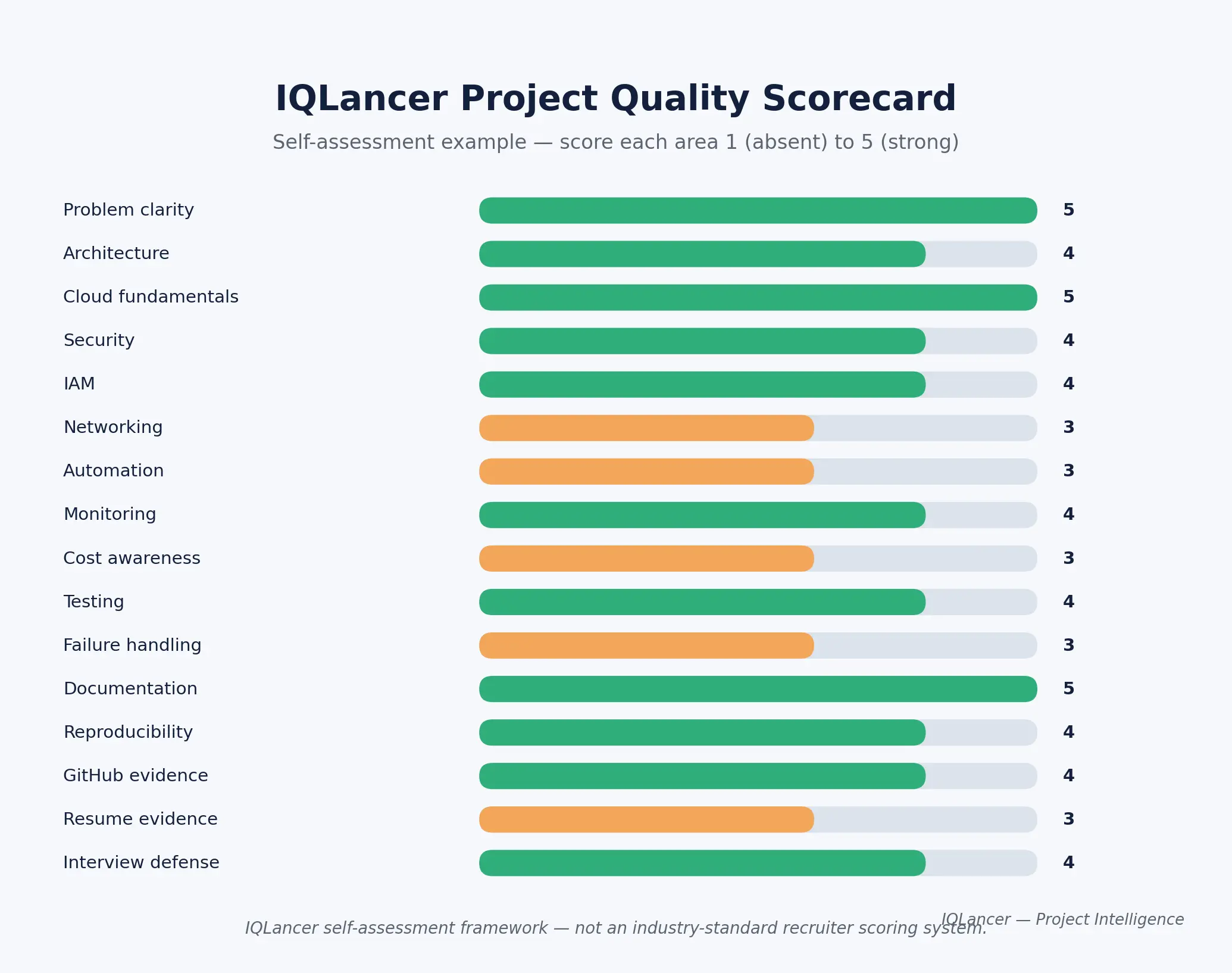
A project scoring mostly 4s and 5s across these areas is genuinely portfolio-ready. A project scoring mostly 1s and 2s needs another pass before it belongs in a job application that’s a more honest gate than “does it look impressive.”
Final Practical Recommendation
Start with the skill gap, not the technology. Pull real job postings for your target role, identify what actually recurs across them, and choose one or two projects from this roadmap that close those specific gaps then build them to full depth using the blueprint standard above rather than starting five shallow ones. Evolve a project through the Depth Ladder before starting an unrelated new one. Document everything as you go, not retroactively.
Conclusion
A strong portfolio isn’t built by collecting as many cloud engineer projects as possible it’s built by choosing a small number that genuinely match what target employers are asking for, then building each one with real architecture, security, monitoring, and cost discipline behind it.
Whether you start with a static site, move into compute and networking, or go straight into infrastructure as code, the standard stays the same: know what you built, know why you built it that way, and be able to show the evidence. That evidence not the project count is what turns a portfolio into a credible signal for hiring managers evaluating cloud portfolio projects and AWS project ideas alike.
The practical next step is simple: pick your target role, pull ten real job postings, and choose your first project from the gap they reveal
1 thought on “Cloud Engineer Projects for Beginners: A Practical Portfolio Roadmap”