A Linux resume for freshers has one job to prove you can actually work with Linux, even if you have never held a Linux job title. No professional experience does not mean no evidence. Practical labs, home labs, academic projects, internships, and certification work all count, as long as you label them honestly and connect them to a specific role. IQlancer article walks through what a recruiter actually needs to see, which skills belong on the page, which projects build real proof, how RHCSA fits into the picture, and how to stay readable to both people and applicant tracking software without chasing keyword-stuffing myths.
What Should a Linux Fresher Resume Prove?
A Linux fresher resume exists to answer a short list of questions a recruiter or hiring manager is actually asking, not to look impressive on its own.
Those questions are usually some version of:
- Does the candidate understand Linux fundamentals?
- Have they actually used Linux, or only read about it?
- Can they perform basic administration tasks unsupervised?
- Can they troubleshoot common problems?
- Have they configured, deployed, or built anything real?
- Can they explain what they did and why?
- Does their background match the specific role being hired for?
This is where most fresher resumes fail, not because the candidate lacks ability, but because the resume only lists tools. A line that reads “Linux, Bash, SSH, Networking, Git, Docker” does not answer any of the seven questions above. It tells a recruiter what you have heard of, not what you can do.
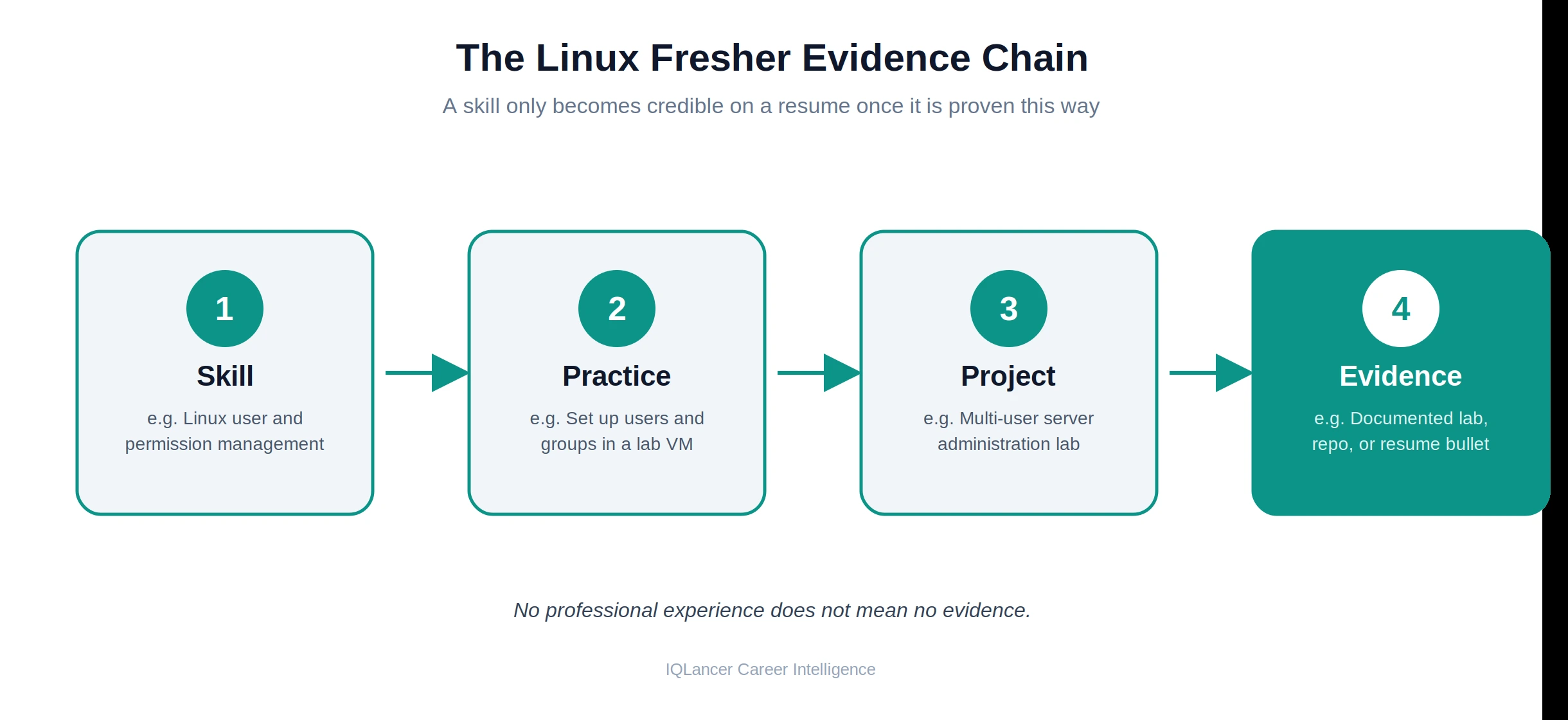
The fix is a simple chain: Skill → Practice → Project → Evidence. A skill only becomes credible once it is tied to something you practiced, which is tied to something you built, which is tied to something you can describe and, ideally, show. Every section that follows is built around strengthening that chain also you can read out ATS Resume Mistakes done by freshers while they applying in Giant companies like Google, Amazon, Oracle etc.
Linux Resume for Freshers With No Experience
There is an important difference between having no professional experience and having no evidence. A Linux resume for freshers with no experience can still be a strong resume, as long as it is built on labs, projects, and preparation rather than a blank skills section.
Legitimate sources of evidence at the fresher stage include:
- Linux labs and virtual machines, where you installed, configured, and broke things on purpose to learn how to fix them
- Personal projects, such as a self-hosted service, a scripted backup routine, or a small server setup
- Academic projects, where Linux, networking, or scripting was part of coursework
- Internships, even short or unpaid ones, where Linux exposure was part of the role
- Certification preparation or certifications actually earned, such as RHCSA
- GitHub repositories or documentation, showing configuration files, scripts, or write-ups of what you built
- Troubleshooting exercises, where you diagnosed and resolved a specific problem in a lab environment
The rule that protects your credibility is simple: label each item accurately. A home lab is a home lab. A class assignment is an academic project. A certification you are studying for is “in progress,” not “certified.” None of these should be written to imply paid employment. Recruiters in technical hiring can usually tell the difference between a described lab and a described job, and a mislabeled item damages trust more than an honestly labeled lab ever would.
Which Linux-Related Role Are You Applying For?
“Linux resume” is a broad phrase, and job titles built around Linux skills vary widely between employers. Before writing anything, it helps to know which of these you are actually targeting:
- Junior Linux Administrator
- Linux / System Administrator
- System Administrator (general, with Linux as the primary OS)
- Technical Support or Infrastructure Support
- Cloud Support (Linux-based cloud environments)
- Entry-level DevOps-adjacent roles that list Linux as a core requirement
Not every employer uses these exact titles, and the boundaries between them shift by company. What stays consistent is the sequence: target role → job description → relevant skills → project or lab evidence. A support-heavy role will weight troubleshooting and ticketing-adjacent skills more heavily, while an administration-heavy role will weight users, permissions, services, and storage. The underlying Linux knowledge may overlap significantly, but which parts you lead with on the resume should shift based on the job description in front of you.
Linux Fresher Resume Structure: What to Include
Before diving into skills or certifications, a fresher resume needs a clear section order that helps recruiters scan quickly and find real evidence first.
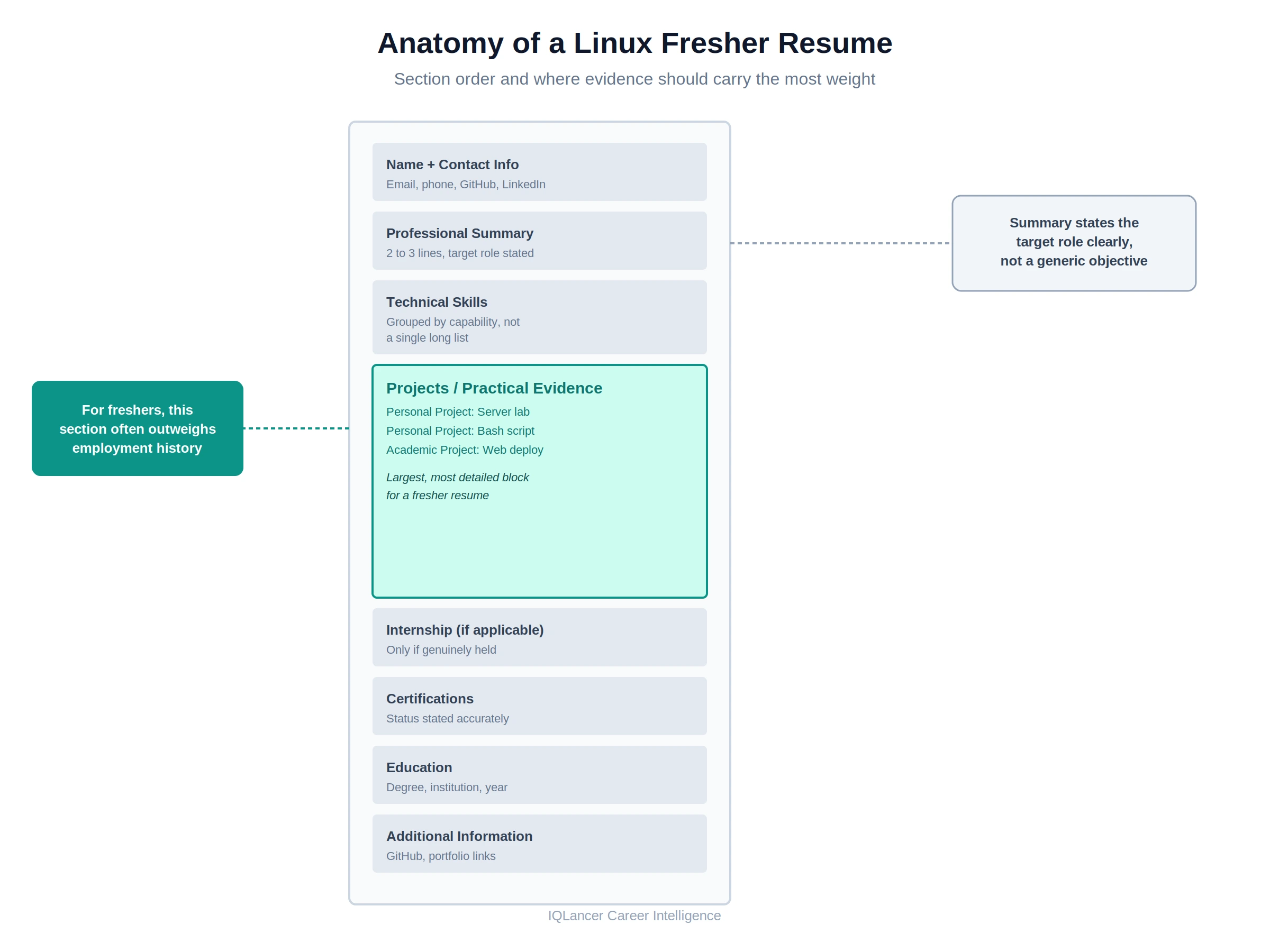
A Linux fresher resume generally follows this order:
- Name and contact information
- Professional summary
- Technical skills
- Projects / practical experience
- Internship, if applicable
- Certifications
- Education
- Relevant additional information (GitHub, portfolio, relevant coursework)
For a candidate without professional Linux employment, projects and practical evidence often deserve more visual prominence than a thin or absent employment history section. A recruiter scanning the page should reach your strongest proof of capability quickly, rather than scrolling past a short education block hoping to find something concrete further down.
What Skills Should a Linux Fresher Put on a Resume?
Skills read better organized by capability than as a single long, undifferentiated list.
- Linux Fundamentals Filesystem structure, users and groups, permissions, processes, services, and package management.
- Administration SSH-based remote access, systemd service management, basic storage handling, log review, basic networking configuration, and simple monitoring.
- Automation Bash or shell scripting for repeatable tasks.
- Security Fundamentals File and directory permissions, basic access control, firewall concepts, and secure remote access practices.
- Related Infrastructure (only if genuinely relevant to the target role) Git for version control, a cloud platform, containers, basic configuration management, networking concepts, or CI/CD exposure.
The rule that matters more than the categories themselves: only list a technology you can genuinely explain and demonstrate if asked in an interview. Listing forty tools because they appeared in a job posting does not create capability, it creates a gap between the resume and the interview, and that gap is usually obvious within the first few technical questions.
How to Show Linux Skills Without Professional Experience
The strongest fresher resumes use a simple pattern: Claim → Context → Evidence.
A weak version of a skills claim looks like this: Linux, Bash, SSH, Networking
A stronger version, illustrative rather than something to copy directly, looks like this: Configured Ubuntu Linux virtual machines, managed users and permissions, used SSH for remote administration, and wrote Bash scripts for routine system checks.
The second version communicates activity, not just familiarity. It tells a recruiter what environment was used, what task was performed, and what tool accomplished it. Adapt the specific wording to what you actually did. If the honest version of your experience is smaller than the example, write the smaller, accurate version. A precise, modest claim is more useful in an interview than an inflated one you cannot back up.
Linux Projects for Freshers That Build Resume Evidence
Projects are the single strongest evidence category available to a fresher, because they can be planned, executed, and documented before you ever apply. Below are project directions that translate directly into resume material, without requiring production access or a paid role.
1. Linux Server Administration Lab Build and manage a multi-user Linux environment (a virtual machine or a small home server), covering user and group setup, package management, and basic service configuration. Demonstrates core administration ability. Keep configuration notes or a short write-up as evidence.
2. Bash Automation Project Write scripts that automate a repeatable task, such as log rotation, backup checks, or system health checks. Demonstrates automation and scripting ability. A GitHub repo with the scripts and a short README is strong evidence.
3. Linux Web Server Deployment Deploy a web server (for example, Nginx or Apache) on a Linux virtual machine and serve a simple application or static site. Demonstrates service configuration and basic networking. Screenshots, configuration files, and a short deployment summary work well as evidence.
4. User and Permission Management Lab Set up multiple users and groups with differentiated access levels on a single Linux system, and document the permission structure. Demonstrates access control understanding. A written access matrix or documented ls -l output is enough evidence.
5. Linux Monitoring Project Configure basic monitoring or logging for a lab system, tracking resource usage or service status over time. Demonstrates operational awareness. Sample logs or dashboard screenshots serve as evidence.
6. Backup Automation Project Script a scheduled backup routine using cron and shell scripting, including basic error handling. Demonstrates reliability-minded automation. The script itself, committed to a repository, is the evidence.
7. Linux + Cloud VM Project Provision a Linux virtual machine on a cloud platform’s free or trial tier, configure it, and deploy something simple on it. Demonstrates cloud-adjacent Linux exposure. A short architecture note and the working setup are sufficient evidence.
For every project, avoid inventing performance metrics or claiming production-scale outcomes. A home lab did not serve real users at scale, and a resume that implies otherwise creates a credibility problem the moment an interviewer asks a follow-up question. The value of these projects is that they answer a very specific question: what can you build today that becomes resume evidence tomorrow?
How to Write Linux Project Descriptions
A useful project bullet generally follows the structure Action + Technology + Task + Result.
Example: Configured Nginx on Ubuntu, created Linux users and permissions, and deployed a test web application on a virtual machine.
Results do not need to be numerical to be useful. “Deployed a working test environment” or “reduced manual steps in the backup process” are valid outcomes even without a percentage attached. What strengthens a project bullet is specificity: name the action taken, the technology used, the task completed, and what existed at the end that did not exist before. Avoid vague phrasing like “worked on Linux systems,” which tells a recruiter nothing they can evaluate.
How to Add RHCSA to a Linux Fresher Resume
RHCSA (Red Hat Certified System Administrator) is one of the more recognized entry-level-to-mid-level Linux credentials, and it is worth handling precisely on a resume. As of 2026, Red Hat restructured its certification program into five specialization tracks, with RHCSA sitting as a level within the Enterprise Linux track, earned by passing the EX200 exam, a fully hands-on, performance-based exam rather than a multiple-choice test. Red Hat’s own certification page confirms the credential validates core Red Hat Enterprise Linux administration skills, and it remains a prerequisite for the RHCE credential.
On a resume, be precise about status:
- RHCSA certified, with the year earned, if you have passed EX200
- RHCSA exam scheduled, if you have booked but not yet sat the exam
- RHCSA preparation in progress, if you are studying but have not booked an exam
- Practical Linux knowledge without RHCSA, communicated instead through projects and labs, if you have not pursued certification at all
A certification supports a fresher’s profile by signaling structured, verified knowledge, but it does not replace practical evidence. A candidate with RHCSA and no projects, and a candidate with strong projects and no RHCSA, are both incomplete profiles from a recruiter’s perspective.
The two work best together. Avoid claiming that RHCSA is mandatory for Linux jobs in general. Some employers list it explicitly, especially in regulated environments, but it is not a universal requirement, and framing it as one overstates what the certification guarantees.
How to Match Linux Resume Keywords to a Job Description
A useful way to think about keywords is a short chain: Job requirement → relevant term → your actual skill → evidence.
Start with the job posting, not with a generic keyword list. Identify recurring terms such as Linux administration, Bash, SSH, networking, troubleshooting, users and groups, permissions, systemd, or shell scripting. For each term that appears, check whether you have a genuine skill and evidence behind it before adding it to your resume. If the job description mentions a tool you have never used, do not add it just because it appeared in the posting.
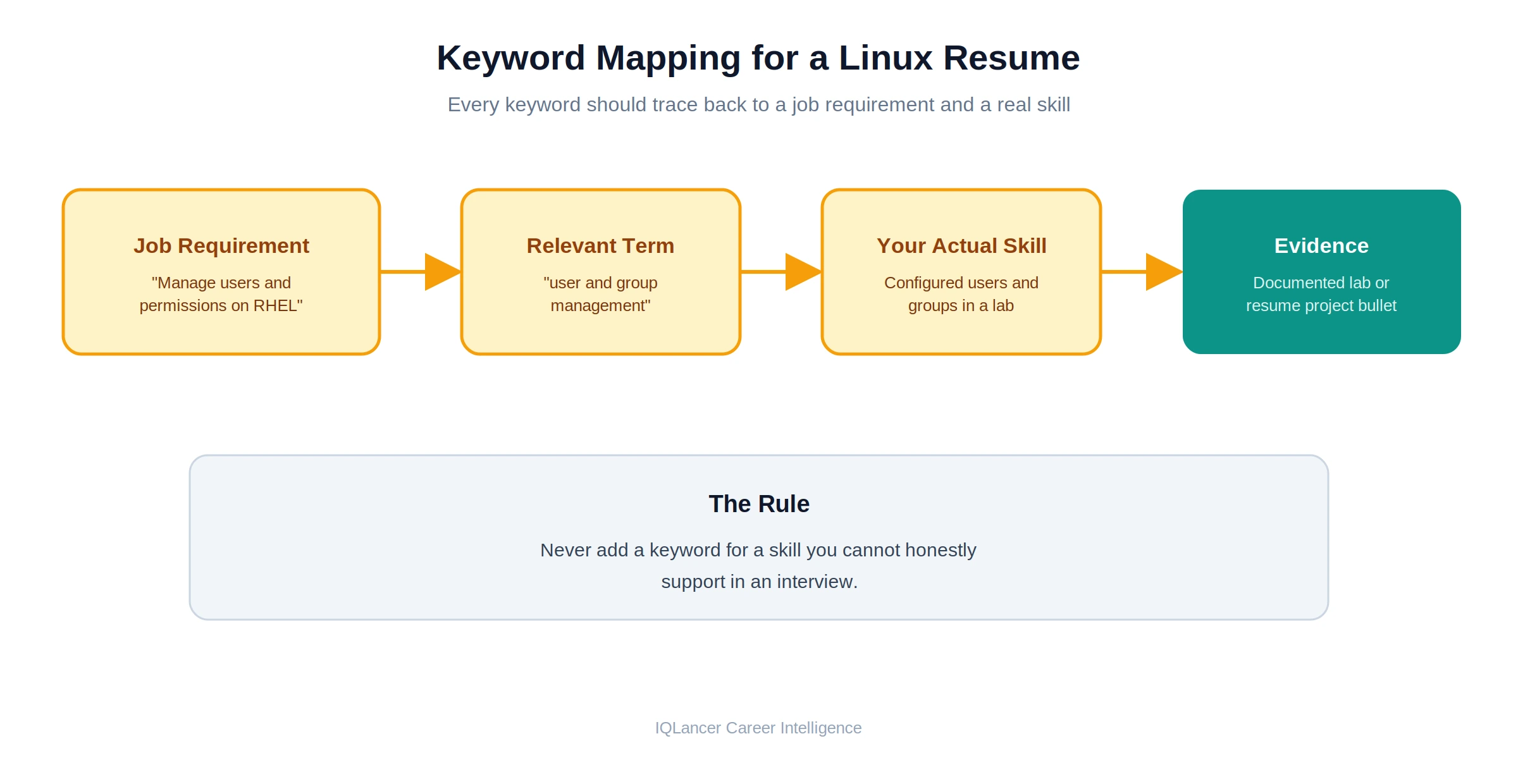
The central rule is straightforward: never add a keyword for a skill you cannot honestly support in an interview. Keyword alignment should happen naturally, as a byproduct of describing real skills and real projects accurately, not as a separate exercise of inserting terms to match a posting.
ATS-Friendly Linux Resume Formatting
ATS-friendly formatting matters, but it is a supporting concern, not the center of resume strategy. Being ATS-friendly does not guarantee an interview; it simply removes formatting as a source of avoidable friction.
Practical formatting choices that help:
- Clear, standard section headings (Skills, Projects, Certifications, Education)
- A readable, single-column structure for the most important content
- Consistent date formats throughout
- Important information presented as text rather than embedded in images
- A logical top-to-bottom hierarchy, strongest evidence near the top
It is worth correcting a few claims that circulate widely but are not universally accurate. Reporting based on how modern applicant tracking platforms actually behave indicates that most major ATS platforms can parse both PDF and Word documents when they are text-based rather than scanned images, and that resumes are not automatically discarded by keyword scoring alone in the way the “75% auto-rejection” figure is often described. That same reporting notes automatic disqualification is more commonly tied to specific screening questions, such as work authorization or required certifications, rather than to resume content or formatting choices generally.
Because ATS platforms, configurations, and individual employer workflows vary, none of this should be treated as a universal guarantee for every system. The safer target is machine readability and recruiter readability together, not an attempt to reverse-engineer one specific platform’s scoring logic.
What Is the Difference Between a Linux Resume and a Linux Administrator Resume?
A “Linux resume” can describe general Linux capability relevant to support, DevOps-adjacent, or infrastructure-adjacent roles. A Linux Administrator resume should be more explicitly aligned to administration responsibilities specifically.
For a Linux Administrator-focused resume, weight the content toward:
- Day-to-day administration tasks
- Troubleshooting methodology
- User and permission management
- Service configuration and management
- Basic networking
- Security fundamentals
- Automation of routine tasks
- Basic infrastructure awareness
- Monitoring exposure, even at a lab level
Not every Linux Administrator posting requires every item on this list. Use the specific job description in front of you to decide which of these to lead with, rather than trying to demonstrate all of them equally in every application.
Linux Fresher Resume Example
The example below is a compact, realistic fresher resume. It uses a fictional candidate, no real company names, and no inflated metrics.
Aditi Sharma aditi.sharma.dev@email.com | LinkedIn | GitHub: github.com/aditisharma-dev
Professional Summary Linux fresher with hands-on experience administering Linux systems through personal labs and academic projects. Comfortable with user and permission management, shell scripting, and basic service configuration. RHCSA exam preparation in progress. Seeking a Junior Linux Administrator or Technical Support role.
Technical Skills Linux fundamentals (filesystem, users/groups, permissions, processes), SSH, systemd, Bash scripting, basic networking (nmcli, static IP configuration), package management (dnf/apt), Git, firewall basics (firewalld)
Projects
- Linux Server Administration Lab (Personal Project): Configured a multi-user Rocky Linux environment across two virtual machines, set up differentiated user permissions, and managed services with system.
- Backup Automation Script (Personal Project): Wrote a Bash script using cron to automate nightly file backups with basic error logging; published to GitHub with documentation.
- Web Server Deployment Lab (Academic Project): Deployed Nginx on Ubuntu to serve a static site as part of a networking coursework module, including basic firewall configuration.
Certifications RHCSA (EX200) – Exam preparation in progress, expected 2027
Education B.Tech in Information Technology, [University Name], 2027 (expected)
You can download the Linux Fresher Resume to take reference or you can contact us.
Why This Example Works
Linux capability is visible immediately in the summary and confirmed through three distinct, honestly labeled projects rather than a single vague claim. Each project names the environment, the action taken, and what exists as a result, which gives a recruiter something concrete to ask about in an interview.
Keywords such as SSH, systemd, Bash, and firewalld appear because they were genuinely used in the described projects, not inserted separately to match a job posting. The certification is listed accurately as “in progress” rather than implying it has been earned, which protects the candidate’s credibility.
Nothing in the resume claims employment, production ownership, or team-based responsibility, because none of that happened yet, and the example does not pretend otherwise.
What Should a Linux Fresher Not Put on a Resume?
A few patterns consistently undermine an otherwise reasonable fresher resume:
- Fake or implied professional experience that did not happen
- Fabricated performance metrics attached to lab or personal projects
- Unsupported “expert” or “advanced” claims for skills only briefly practiced
- Keywords copied directly from a job description without matching skill
- Certifications listed as earned when they are only in progress
- Every Linux command ever learned, listed individually
- Unrelated technologies added purely for keyword volume
- Project labels that blur into implying paid employment
- Exaggerated scope or impact of home-lab work
- Claiming production-environment experience from a personal or academic project
Each of these creates the same underlying risk: a gap between what the resume implies and what the candidate can demonstrate in conversation, which surfaces quickly once an interview moves past the first few questions.
What Should a Linux Resume PDF for Freshers Contain?
A useful Linux resume PDF for a fresher should be built around the same substance covered throughout this article, exported cleanly rather than assembled around a decorative template. At minimum, it should contain:
- A clear target role or focus area
- A short professional summary
- An organized, honest technical skills section
- Two to three well-described practical projects
- Accurate certification status
- Education details
- Relevant links, such as GitHub or a portfolio, where applicable
- Clean, consistent formatting throughout
There is no downloadable IQLancer template referenced here. The goal of this section is to explain what a genuinely useful PDF should contain, not to promise an asset that does not exist.
What Changes in a Linux Resume After 1 to 4 Years of Experience?
As Linux experience accumulates, resume evidence should shift away from projects and labs and toward real production responsibility.
| Experience | Resume Evidence Should Emphasize |
|---|---|
| Fresher | Projects, labs, skills, education, certification |
| 1 year | Real support or admin exposure and responsibilities |
| 2 years | Troubleshooting, automation, infrastructure responsibilities |
| 3 years | Ownership, production systems, reliability, automation |
| 4 years | Larger environments, ownership, architecture exposure |
| Senior | Leadership, architecture, scale, reliability, strategy |
This progression is intentionally brief here. Experience-level searches such as a Linux resume for one year of experience, a Linux system administrator resume for three years of experience, or a Senior Linux Administrator resume each carry their own hiring expectations that deserve dedicated treatment rather than a short subsection inside a fresher-focused article.
Linux Fresher Resume Checklist
- [ ] Target role identified
- [ ] Job description reviewed
- [ ] Linux skills genuinely supported
- [ ] Skills connected to evidence
- [ ] Two to three meaningful projects included, where appropriate
- [ ] Project descriptions explain actual work performed
- [ ] Certification status is accurate
- [ ] Keywords are natural, not stuffed
- [ ] Resume is readable at a glance
- [ ] Important information is text-based, not image-based
- [ ] Dates are consistent throughout
- [ ] No fake experience
- [ ] No fake metrics
- [ ] A recruiter can understand your Linux capability quickly
When a Good Linux Resume Still Doesn’t Get Interview Calls
A well-built resume improves your odds, but it does not guarantee interviews. Several factors sit outside the resume itself:
- Role fit: the target role may genuinely need more experience than the position implies
- Actual technical requirements: some postings understate what is really required
- Project quality and depth: a thin project list competes poorly against stronger applicant pools
- Competition volume: popular entry-level roles often receive a high number of applications
- Employer-specific requirements: some employers filter on factors unrelated to resume quality, such as location or visa status
- Hiring volume and timing: some periods simply have fewer open roles
- Market conditions: broader hiring trends affect response rates regardless of resume quality
Being ATS-friendly does not mean being job-ready. A resume can be perfectly readable to both a parser and a recruiter and still fall short on the evidence a specific role requires. It is worth resisting the instinct to blame ATS for every rejection; often the more useful diagnostic is whether the resume’s evidence genuinely matches the target role’s requirements.
IQLancer Linux Resume Audit Framework
Use this framework to self-audit a Linux fresher resume across eight areas, rating each as Pass, Review, or Fix.
- Target Role: Is a specific role clearly identifiable from the resume?
- Skills: Are listed skills organized and realistic for a fresher profile?
- Evidence: Does each major skill connect to a project, lab, or certification?
- Projects: Are project descriptions specific, honest, and technically clear?
- Certification: Is certification status stated accurately?
- Keywords: Do keywords appear naturally, tied to genuine skills?
- ATS Readability: Is the content text-based, consistently formatted, and free of unnecessary complexity?
- Recruiter Readability: Could a recruiter understand your Linux capability within thirty seconds of scanning the page?
Any area marked “Fix” points to a specific, actionable gap, whether that means adding a project, correcting a certification claim, or tightening a skills section, rather than a vague sense that “the resume needs work.”
FAQ
1. How do I write a Linux resume for freshers with no experience?
Build the resume around labs, personal projects, academic work, and certification preparation instead of employment history, and label each item accurately as a project or lab rather than a job.
2. What Linux skills should a fresher put on a resume?
Core fundamentals (filesystem, users, permissions, processes), basic administration (SSH, systemd, package management), and shell scripting, organized by capability rather than listed as one long, unstructured line.
3. What projects can I add to a Linux fresher resume?
A server administration lab, a Bash automation script, a web server deployment, a user and permission management lab, or a small cloud VM project all work well, as long as they are documented honestly.
4. Is RHCSA useful for a Linux fresher resume?
Yes, as a signal of structured, verified knowledge, especially alongside real project evidence. It is not a universal job requirement, and it works best paired with demonstrated practical skills, not as a substitute for them.
5. How do I make a Linux resume ATS-friendly?
Use clear section headings, consistent formatting, text-based content rather than images, and a logical structure. Modern ATS platforms generally handle both PDF and Word formats when the content is text-based.
6. What should a Linux resume for freshers PDF contain?
The same substance as a strong Linux fresher resume overall: target role, summary, organized skills, two to three real projects, accurate certification status, education, and clean formatting.
7. Can I get a Linux Administrator job without professional Linux experience?
It is possible, particularly for junior or entry-level roles, when the resume demonstrates genuine capability through labs, projects, and certification work rather than relying on employment history that does not yet exist.
8. How should a Linux resume change after 1 to 2 years of experience?
The emphasis shifts from labs and academic projects toward real support or administration responsibilities, troubleshooting handled on the job, and early signs of automation or infrastructure ownership.